Contents
- Unit 1: Using Objects and Methods
- Unit 2: Selection and Iteration
- Unit 3: Class Creation
- Unit 4: Data Collections
- Exam Tips
- Quiz 1: Variables, Operators and Strings
- Quiz 2: Selection and Iteration
- Quiz 3: Methods, Classes and Arrays
- Quiz 4: Integer Arithmetic and Assignment
- Quiz 5: Casting, Doubles and Rounding
- Quiz 6: Strings, the Math Class and Methods
- Programming Exercises
AP Computer Science A: Lecture Notes
These are the notes of my AP Computer Science A lectures, organised by the four units of the AP course. AP CSA uses a subset of Java; whenever a feature is outside that subset, it is pointed out. Six practice quizzes, which check your answers for you, and all the programming exercises are at the end of the page. Almost every exercise asks for a method with a given header; methods are introduced early in Unit 1 for this reason.
| Unit | Topic | Status |
|---|---|---|
| 1 | Using Objects and Methods | covered |
| 2 | Selection and Iteration | covered |
| 3 | Class Creation | in progress |
| 4 | Data Collections | arrays, 2D arrays and binary search covered; ArrayList, sorting and recursion coming later |
Unit 1: Using Objects and Methods
How a Java Program Runs
In a compiled language such as C, the compiler translates the high-level source code into low-level machine code (an .exe file full of 0s and 1s). Machine code is a list of very small instructions for one particular processor, for example:
LOAD 2, R1
LOAD 4, R2
ADD
MOVE R3
The arithmetic-logic unit (ALU) of the CPU adds the contents of the registers R1 and R2 and stores the result. Because these instructions belong to one processor family, the executable runs only on that kind of machine.
Java takes a different route:
| Step | File | What happens |
|---|---|---|
| 1 | Test.java |
We write the source code. |
| 2 | Test.class |
The Java compiler produces bytecode, which is not tied to any processor. |
| 3 | JVM | The Java Virtual Machine behaves like a virtual CPU and runs the bytecode on the real processor (Intel, AMD, ARM, …). |
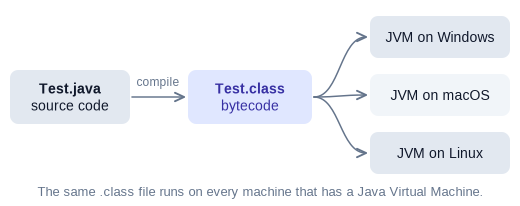
Remark: Java is an object-oriented language: everything lives inside classes.
Syntax, the main Method and Printing
Syntax is the set of writing rules of a programming language.
public class Main {
    public static void main(String[] args) {
        System.out.println("Hello World");
    }
}publicis an access modifier (the other one we use isprivate).class Maindeclares a class namedMain. Every class is stored in a file with the same name:Mainlives inMain.java.- Java starts running a program from the
mainmethod. - Every statement ends with a semicolon
;.
System.out.println() and System.out.print() are methods. A method is like a function in mathematics: if , then . We give it an input and it does its job.
printlnprints its argument and then moves to a new line.printprints its argument and stays on the same line.
System.out.print("Hello ");
System.out.print("World");
System.out.println("!");
System.out.println("Next line");
Hello World!
Next line
Tip: In VS Code, typing
soutand pressing Tab expands toSystem.out.println().
Comments
Comments are notes for people; the compiler ignores them.
// a one-line comment

/* a comment that
   spans several lines */

/**
 * A documentation comment, written above a method.
 * Precondition: n > 0       (what must be true before the call)
 * Postcondition: returns the sum of the digits of n   (what the method guarantees)
 */
On the AP exam the method descriptions are written as such comments, with preconditions and postconditions. Read them carefully: a precondition is something you may assume, so you do not need to check it in your code.
Statements and the Three Kinds of Errors
A program is a list of instructions, called statements. There are three kinds of errors:
- Syntax (compile-time) error: the code breaks the writing rules, so it does not compile. Example: a missing
;. - Run-time error (exception): the code compiles, but crashes while running. Example: dividing an
intby 0, or an index outside a string. - Logic error: the code runs, but produces the wrong result. Example: dividing the sum of three scores by 2.
Input with Scanner
Output goes through System.out.println() and System.out.print(). To read input from the keyboard we use the Scanner class:
import java.util.Scanner;

public class Main {
    public static void main(String[] args) {
        Scanner sc = new Scanner(System.in);
        System.out.println("Enter a number");
        int a = sc.nextInt();
        System.out.println("The square of your number is: " + (a * a));
    }
}
Enter a number
5
The square of your number is: 25
Variables and Primitive Types
A variable is a named box in memory that stores a value. Java has eight primitive types:
| Type | Size | Values |
|---|---|---|
byte |
8 bits | whole numbers from −128 to 127 |
short |
16 bits | whole numbers from −32 768 to 32 767 |
int |
32 bits | whole numbers from −2 147 483 648 to 2 147 483 647 |
long |
64 bits | very large whole numbers |
float |
32 bits | decimal numbers, about 7 significant digits |
double |
64 bits | decimal numbers, about 15–16 significant digits |
boolean |
true or false |
|
char |
16 bits | a single character, such as 'A' |
(1 byte = 8 bits.) AP CSA uses only three of them: int, double and boolean. String is not a primitive type; it is a class (see below).
Declaring and Initializing Variables
Declaration creates the variable; initialization gives it its first value.
int n;        // declaration: the box exists, but holds no value yet
n = 10;       // initialization
int a = 3;    // both at once
The general patterns are Type identifier; and Type identifier = value;. Using a variable before it has a value is a compile-time error.
Several variables can be declared together, and assignments are evaluated from right to left:
int x, y, z;
x = y = z = 50;          // first z = 50, then y = z, then x = y
System.out.println(x + y + z);   // 150
Identifiers and Naming Conventions
Names of variables (identifiers) follow these rules:
- They may contain letters, digits, underscores
_and dollar signs$. - They cannot start with a digit, and cannot contain spaces.
- They are case-sensitive:
appleandAppleare different variables. - Reserved words (
int,boolean,for,if,while,double, …) cannot be used.
By convention, Java variables use camelCase: areaOfCircle, myNum, totalVolume. Descriptive names make code much easier to read.
Constants: final
final makes a variable a constant: after its first value it cannot change.
final int MY_NUM = 15;
MY_NUM = 20;   // error: cannot assign a value to final variable MY_NUM
By convention, constants are written in capital letters with underscores: final double TAX_RATE = 0.13;, final double PI = 3.14159;.
How Integers Are Stored
Memory is made of bits, each either 0 or 1. With bits we can write different patterns: 2 patterns with 1 bit, 4 with 2 bits, 8 with 3 bits.
Binary numbers work like decimal ones, but with powers of 2 instead of powers of 10:
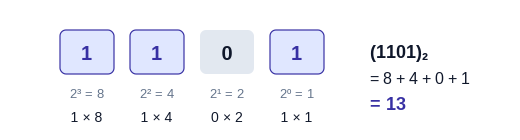
Negative numbers (two's complement). Half of the patterns are used for negative values: a pattern whose first bit is 1 is negative. With 3 bits:
| Bits | 000 | 001 | 010 | 011 | 100 | 101 | 110 | 111 |
|---|---|---|---|---|---|---|---|---|
| Value | 0 | 1 | 2 | 3 | −4 | −3 | −2 | −1 |
With bits the range is
so 3 bits give , and a 32-bit int gives . These limits are Integer.MIN_VALUE and Integer.MAX_VALUE.
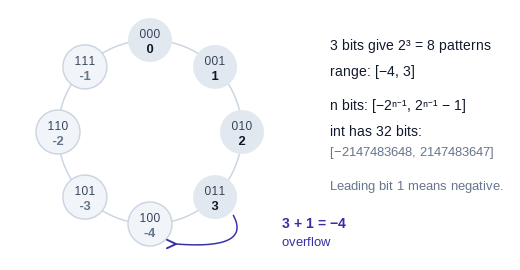
Overflow. If a result does not fit, it silently wraps around. In 4 bits (range ), gives:
  0111   (7)
+ 0101   (5)
------
  1100   (-4)
In Java, Integer.MAX_VALUE + 1 is Integer.MIN_VALUE, with no error message.
Summary: integers are exact, but they have limits.
Doubles Are Approximate
has infinitely many digits, but memory is finite, so a double stores only an approximation. The same happens in binary for numbers like .
Never compare doubles with ==. Think of as the distance between and ; if it is smaller than a small tolerance, we treat the numbers as equal:
double z = 4.3 - 3.1;
System.out.println(z == 1.2);                    // false
System.out.println(Math.abs(z - 1.2) < 1e-4);    // true

public static boolean compareDouble(double d1, double d2, double tol) {
    return Math.abs(d1 - d2) < tol;
}
1e-4 is scientific notation for .
Arithmetic Expressions
| Operator | Name | Example |
|---|---|---|
+ |
Addition | x + y |
- |
Subtraction | x - y |
* |
Multiplication | x * y |
/ |
Division | x / y |
% |
Modulus (remainder) | x % y |
The type of the result depends on the operands: if both are int, the result is an int; if at least one is a double, the result is a double.
Be careful with /. With two int operands Java performs integer division and throws the decimal part away:
10 / 3     // 3
3 / 2      // 1
3 / 4      // 0
17 / 8     // 2
10.0 / 3   // 3.3333333333333335
a % b is the remainder of : 17 % 5 is 2, 1378 % 10 is 8 (the last digit), and 1378 / 10 is 137 (everything except the last digit).
Operators of the same precedence are evaluated from left to right: 5 - 7 - 1 is (5 - 7) - 1 = -3.
Type Casting
Widening (to a larger type) happens automatically, because nothing is lost. Narrowing needs an explicit cast with the operators (int) or (double):
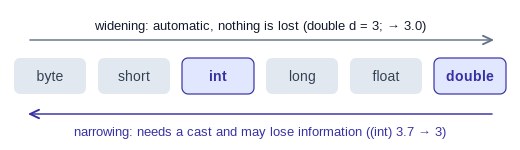
int a = 3;
double d = a;            // 3.0, automatic
int n = (int) 3.7;       // 3: truncation, not rounding
int m = (int) -2.8;      // -2
a = 3.4;                 // error: possible lossy conversion from double to int
The position of a cast matters:
int a = 8, b = 3;
System.out.println((double) a / b);     // 8.0 / 3 = 2.6666666666666665
System.out.println((double) (a / b));   // (double) 2 = 2.0
Compound Assignment and Increment
= takes the value on its right and stores it in the variable on its left (5 = x; is an error).
| Operator | Example | Same as |
|---|---|---|
+= |
x += 3 |
x = x + 3 |
-= |
x -= 3 |
x = x - 3 |
*= |
x *= 3 |
x = x * 3 |
/= |
x /= 3 |
x = x / 3 |
%= |
x %= 3 |
x = x % 3 |
x++ adds 1 to x, and x-- subtracts 1.
Java also has bitwise operators (
&,|,^, and&=,|=,^=), which work on the individual bits:5 ^ 3is101 ^ 011 = 110 = 6. They are not part of AP CSA.
Three Basic Algorithms
1. Swapping two values. a = b; b = a; does not work: after a = b the old value of a is lost.
| Statement | a | b | temp |
|---|---|---|---|
| start | 8 | 3 | |
int temp = a; |
8 | 3 | 8 |
a = b; |
3 | 3 | 8 |
b = temp; |
3 | 8 | 8 |
2. Rounding. A cast only truncates, so we shift by 0.5 first:
int n = (int) (d + 0.5);   // d positive: 2.5 -> 3, 2.4 -> 2
int m = (int) (d - 0.5);   // d negative: -1.8 -> -2, -1.2 -> -1
3. The digits of an integer. % and / with 10:
int n = 2348;
int d1 = n % 10;           // 8
int d2 = (n / 10) % 10;    // 4
int d3 = (n / 100) % 10;   // 3
For a number of any length, repeat until no digits are left:
while (n > 0) {
    System.out.println(n % 10);   // prints the digits from right to left
    n = n / 10;
}
Methods as Functions
In mathematics, a function takes an input and gives back an output: gives . In Java the same idea is called a method:
public static int square(int x) {
    return x * x;
}| Part | In the example | Meaning |
|---|---|---|
| return type | int |
the type of the output |
| name | square |
the name of the function, like |
| parameter | (int x) |
the input, with its type, like |
return |
return x * x; |
gives the output back |
For now every method starts with public static; what these two words mean comes in Unit 3.
Where it goes. A method is written inside the class, but outside main. main calls it with an argument, the actual input value:
public class Main {
    public static int square(int x) {
        return x * x;
    }

    public static void main(String[] args) {
        int a = square(3);              // a = 9
        System.out.println(a);
        System.out.println(square(5));  // 25
        System.out.println(square(2) + square(3));   // 4 + 9 = 13
    }
}
When Java reaches square(3), it jumps into the method with x = 3, computes 3 * 3, and comes back with the value 9, which takes the place of square(3) in main. A method that returns a value can be used anywhere such a value can be used: in an assignment, in println, in a bigger expression.
Several inputs. Parameters are separated by commas, and each has its own type. The output may have a different type from the inputs:
public static double average(int a, int b) {
    return (a + b) / 2.0;       // 2.0, not 2: no integer division
}
// average(3, 4) returns 3.5- The value after
returnmust have the return type of the method. returnends the method at once; nothing after it runs.- The arguments must match the parameters in number, order and type:
average(3)andaverage("3", 4)are compile errors.
The method returns, main prints. A common beginner mistake is to print inside the method instead of returning:
public static int square(int x) {   // wrong
    System.out.println(x * x);      // prints 9 on the screen...
}                                   // ...but returns nothing: compile error
Printing shows a value to the person in front of the screen; returning gives it to the code that called the method, which can store it, print it or compute with it. In the exercises, a method that has to "find" or "compute" something returns it, and main prints the result.
void methods. A method that does not give a value back has the return type void. It is called as a statement on its own:
public static void printLine(int n) {   // prints n dashes
    for (int i = 0; i < n; i++) {
        System.out.print("-");
    }
    System.out.println();
}
// in main: printLine(10);
System.out.println itself is a void method. Use void only when the job is to do something (print a pattern, change an object), not to compute a value.
Examples. The three basic algorithms above, written as methods:
public static int round(double d) {          // for d >= 0
    return (int) (d + 0.5);
}

public static int lastDigit(int n) {
    return n % 10;
}

public static int tensDigit(int n) {
    return (n / 10) % 10;
}
round(2.5) returns 3, lastDigit(2348) returns 8, and tensDigit(2348) returns 4. (Swapping cannot be written as a method this way; the reason is in Pass by Value in Unit 3.)
From here on, almost every programming exercise asks for a method with a given header, for example public static int reverse(int n). You write the method, and test it by calling it from main with the examples given (see the template at the start of Programming Exercises).
The + Operator with Strings
If at least one operand of + is a String, + means concatenation (joining), and the other operand is turned into a string. Since + is evaluated from left to right, the order matters:
System.out.println(3 + 5 + "Alice");   // "8Alice":  3 + 5 = 8 first
System.out.println("Alice" + 3 + 5);   // "Alice35": "Alice3" first, then + 5
System.out.println("Alice" + (3 + 5)); // "Alice8"
Primitive Types and Reference Types
A primitive variable holds its value directly. Every other type (String, arrays, any class) is a reference type: the variable holds the address of an object somewhere else in memory. A reference that points nowhere is null.
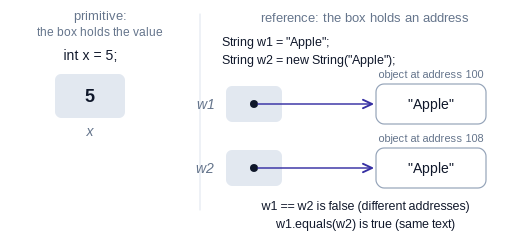
The String Class
String is a class, so a string is an object with methods, reached with the dot operator: name.length(). The String methods in AP CSA are:
| Method | Returns |
|---|---|
length() |
the number of characters (int) |
substring(from) |
the part from index from to the end |
substring(from, to) |
the part from from (included) to to (excluded) |
indexOf(str) |
the index of the first occurrence of str, or −1 |
equals(other) |
true if the two strings have the same characters |
compareTo(other) |
a negative number, 0 or a positive number (dictionary order) |
length() and substring()
Indices start at 0, so the last index is length() - 1.
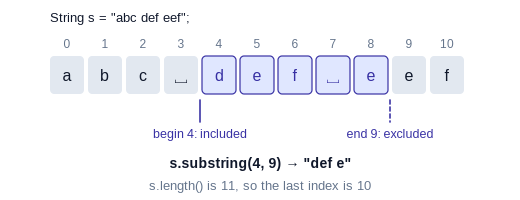
String s = "abc def eef";
s.length()            // 11
s.substring(4)        // "def eef"
s.substring(4, 9)     // "def e"
s.substring(2, s.length())   // from index 2 to the end
s.substring(i, i + 1) // the single character at index i
The indices must satisfy . substring(k, k) is the empty string ""; anything outside these limits throws a StringIndexOutOfBoundsException:
Exception in thread "main" java.lang.StringIndexOutOfBoundsException: begin 17, end 16, length 16
Traversing a String
To traverse means to visit the elements one by one. The same pattern works for strings, arrays and lists:
for (int i = 0; i < w.length(); i++) {
    String ch = w.substring(i, i + 1);   // the i-th character
    // ...
}
indexOf()
String txt = "Please locate where 'locate' occurs!";
txt.indexOf("locate")   // 7, the first occurrence
txt.indexOf("xyz")      // -1, not found

if (email.indexOf("@") == -1) {
    System.out.println("Not a valid email address!");
}
equals() and ==
String w1 = "Apple";
String w2 = new String("Apple");
System.out.println(w1 == w2);        // false: different addresses
System.out.println(w1.equals(w2));   // true:  same characters
== compares the addresses (see the figure above). Sometimes "Apple" == "Apple" prints true, because Java stores identical literals only once, but we cannot rely on it.
Rule: compare strings with
equals()(orcompareTo() == 0), never with==. This holds for all reference types.
compareTo()
Every character has a numeric code (the ASCII table). Digits come before capital letters, and capital letters before small letters:
w1.compareTo(w2) compares the strings in dictionary order using these codes. At the first position where they differ, it returns the difference of the two codes:
- negative if
w1comes first, - 0 if the strings are equal,
- positive if
w1comes later.
"green".compareTo("red")   // negative: 'g' comes before 'r'
"red".compareTo("green")   // positive
"Red".compareTo("green")   // negative: capital 'R' comes before small 'g'
"Red".compareTo("Red")     // 0
"abc".compareTo("aBc")     // positive: 'b' comes after 'B'
Outside the AP Subset
toUpperCase() and toLowerCase() are not on the exam, but they are useful for checking user input:
if (answer.toLowerCase().equals("yes")) { ... } // accepts yes, Yes, YESThe Math Class
Math is a class of ready-made static methods; we call them with the class name.
| Method | Returns |
|---|---|
Math.abs(x) |
the absolute value of an int or a double |
Math.pow(base, exponent) |
as a double |
Math.sqrt(x) |
as a double |
Math.random() |
a random double with |
Math.PI and Math.E are the constants and .
Mathneeds noimport(unlikeScanner): it is part ofjava.lang, which every program can use.absis overloaded: there are two methods with this name,int abs(int x)anddouble abs(double x). Anintargument gives anintback, adoublegives adouble:Math.abs(-3.7)is3.7.- A typical use of
absis comparing doubles with a tolerance,Math.abs(x - y) < 0.001(see Doubles Are Approximate).
Special values of pow and sqrt.
System.out.println(Math.pow(-1, 0.5));   // NaN ("not a number")
System.out.println(Math.pow(-2, 3));     // -8.0
System.out.println(Math.pow(0, -5));     // Infinity, since 1 / 0^5 = 1 / 0
System.out.println(Math.pow(0, 0));      // 1.0
System.out.println(Math.sqrt(-4)); // NaN- A negative base with a fractional exponent always returns
NaN: is not a real number. - A negative base with an integer exponent is no problem.
Math.sqrt(d)needs .
Math.max and Math.min return the larger and the smaller of two numbers. They are not in the AP subset, but they are easy to write ourselves:
public static int max(int x, int y) {
    if (x > y) {
        return x;
    } else {
        return y;
    }
}
Also outside the AP subset: Math.round(x) rounds to the nearest integer, Math.ceil(x) rounds up (, the smallest integer ) and Math.floor(x) rounds down (, the largest integer ).
Random Integers with Math.random()
Math.random() gives a decimal in . To get random integers we do three steps:
- Scale: multiplying by 30 stretches the interval to .
- Shift: adding 5 moves it to .
- Cast:
(int)cuts off the decimals, leaving the integers .
![Four number lines: [0,1), then [0,30), then [5,35), then the integers 5 to 34](/img/notes/ap-csa/random-scale-shift.svg)
In general:
Step by step, for the integers in :
- Turn it into a half-open interval: the integers in are the integers in .
- Find the range:
range = b + 1 - a. - Scale:
range * Math.random()lies in . - Shift by :
a + range * Math.random()lies in . - Convert to an integer:
(int) (a + range * Math.random()).
Examples.
- A random integer from 10 to 20, both included: , the range is 11, so
(int) (11 * Math.random() + 10). - A random even integer from 1 to 100: the even numbers are . Choose a random integer in , i.e. in with range 50, then multiply by 2:
((int) (50 * Math.random() + 1)) * 2. - A die:
(int) (6 * Math.random() + 1)gives 1, 2, …, 6. - A coin:
(int) (2 * Math.random())gives 0 or 1. 7 * Math.random() + 18lies in : the smallest possible value is 18, the largest is just below 25.
Calling Methods
To call a method we write its name and give it the arguments it needs. For a method of another class, such as Math, we write the class name first. A method that returns a value can be used inside an expression, exactly like our own methods in Methods as Functions:
double r = Math.sqrt(16);            // 4.0
double hyp = Math.sqrt(3 * 3 + 4 * 4);   // 5.0
System.out.println(Math.abs(-7));    // 7
A void method returns nothing; we call it as a statement on its own, like System.out.println("hi");.
Unit 2: Selection and Iteration
Boolean Expressions
A boolean is true or false. Comparison operators produce booleans:
| Operator | Meaning | Example |
|---|---|---|
== |
equal to | x == y |
!= |
not equal | x != y |
> |
greater than | x > y |
< |
less than | x < y |
>= |
greater than or equal | x >= y |
<= |
less than or equal | x <= y |
int age = 18;
System.out.println(age >= 18);   // true
A boolean expression is a piece of code that evaluates to true or false. Its value can be stored in a boolean variable:
int x = 10, y = 3;
boolean checkResult = x >= y;   // true
The condition of an if statement can be any boolean expression, including ones joined with &&, || and !. For example, this loop draws 50 random integers from 1 to 100 and prints only the multiples of 5:
for (int i = 0; i < 50; i++) {
    int a = (int) (100 * Math.random() + 1);
    if (a % 5 == 0) {
        System.out.println(a);
    }
}
Logical Operators
| Operator | Name | True when |
|---|---|---|
&& |
and | both sides are true |
|| |
or | at least one side is true |
! |
not | the operand is false |
| A | B | A && B | A || B |
|---|---|---|---|
| T | T | T | T |
| T | F | F | T |
| F | T | F | T |
| F | F | F | F |
boolean isLoggedIn = true, isAdmin = false;
System.out.println(isLoggedIn && !isAdmin);   // true
System.out.println(isLoggedIn || isAdmin);    // true
De Morgan's Laws
Negating a comparison flips it:
!(a > b)isa <= b,!(a < b)isa >= b,!(a == 10)isa != 10.
Negating a compound expression: move the ! inside and switch the operator (&& ↔ ||):
Examples.
!(!x || !y)isx && y.!((a < b) || (b != 10))isa >= b && b == 10.!((x || y) && (!x || z))is(!x && !y) || (x && !z).if (!(score >= 60 || homeworkMissing))isif (score < 60 && !homeworkMissing).
Operator Precedence
From highest to lowest:
()parentheses- unary operators:
!,++,--, casts(int),(double) *,/,%+,-<,>,<=,>===,!=&&||=,+=, … (assignment)
A way to remember the order: A-C-L-A, Arithmetic, Comparison, Logical, Assignment. Note that && comes before ||: T || F && T means T || (F && T).
System.out.println(3 + 4 * 2 > 10 && 5 % 2 == 1); // 11 > 10 && 1 == 1 -> trueWhen in doubt, add parentheses: they cost nothing and make code easier to read.
Short-Circuit Evaluation
Java stops evaluating a logical expression as soon as the answer is known:
- in
A || B, ifAis true,Bis not evaluated (the result is already true); - in
A && B, ifAis false,Bis not evaluated.
This is useful to guard against errors:
if (count != 0 && total / count > 50) { ... }   // no division by zero
if (i < s.length() && s.substring(i, i + 1).equals("a")) { ... }
if, else if, else
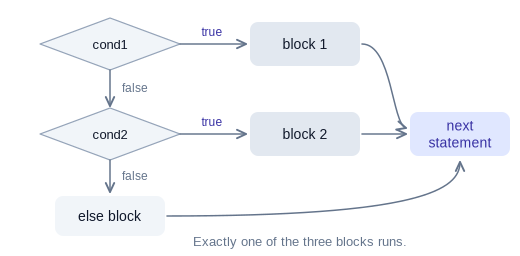
if (condition1) {
    // block 1
} else if (condition2) {
    // block 2
} else {
    // block 3
}
- A plain
ifwithoutelsemay run its block or skip it. - With
if / else, exactly one of the two blocks runs. - With
if / else if / … / else, exactly one block runs: the first one whose condition is true, or theelseblock if none is. - Without the final
else, at most one block runs: if no condition is true, nothing in the chain runs.
Example. Letter grades AA, BA, BB, CB, CC, DC, DD, FF: with AA, BA or BB the student passes; with CB or CC they must take a preliminary exam; otherwise they cannot take the exam. Strings are compared with equals, and toUpperCase() lets the user type aa as well:
String grade = "aa";
grade = grade.toUpperCase();
if (grade.equals("AA") || grade.equals("BA") || grade.equals("BB")) {
    System.out.println("Congratulations, you passed!");
} else if (grade.equals("CB") || grade.equals("CC")) {
    System.out.println("You need to enter the preliminary exam!");
} else {
    System.out.println("You cannot take the exam.");
}
while Loops
A while loop repeats its block as long as its condition is true. It has three parts: the loop variable set before the loop, the condition, and an update inside the block that eventually makes the condition false (otherwise the loop never ends).
public static int sumOfDigits(int n) {   // n = 1378 returns 19
    int sum = 0;
    while (n > 0) {
        int last = n % 10;
        sum += last;
        n = n / 10;
    }
    return sum;
}| n | last | sum |
|---|---|---|
| 1378 | 0 | |
| 137 | 8 | 8 |
| 13 | 7 | 15 |
| 1 | 3 | 18 |
| 0 | 1 | 19 |
A classic bug: if
int sum = 0;is written inside the loop,sumis reset to 0 in every iteration, and it does not even exist after the loop. Variables that collect a result are declared before the loop.
while (condition) {   // condition: any boolean expression
    // body
}
The condition is checked before every iteration: at the end of the body, Java goes back and checks it again. If it is true, the body runs once more; if it is false, the program continues after the loop.
Loop Errors
Infinite loop. The loop condition must become false at some point. Here i is never updated, so i < 10 stays true and 0 is printed forever:
int i = 0;
while (i < 10) {
    System.out.println(i);
}
The correction is to update the loop variable in the body. With i < 3:
int i = 0;
while (i < 3) {
    System.out.println(i);
    i++;
}| i | output |
|---|---|
| 0 | 0 |
| 1 | 1 |
| 2 | 2 |
| 3 | (condition false, loop ends) |
A loop that never runs. If the condition is false at the start, the body is skipped completely. This is a logic error, not a compile error:
int k = 10;
while (k < 5) {      // false right away
    System.out.println(k);
    k++;
}
Examples.
Print the odd numbers between 1 and 100, in two ways: jump by 2, or check every number.
int i = 1;
while (i < 100) {
    System.out.println(i);
    i += 2;
}
int i = 1;
while (i < 100) {
if (i % 2 == 1) {
System.out.println(i);
}
i++;
}Print the numbers from 100 down to 1:
int i = 100;
while (i > 0) {
    System.out.println(i);
    i--;
}
Accumulation and Successive Products
Accumulation. To add up many numbers, keep a running total that starts at 0. The sum :
int sum = 0;
int i = 1;
while (i <= 100) {
    sum = sum + i;    // or: sum += i;
    i++;
}
System.out.println(sum);   // 5050
The sum of the numbers up to 100: only the step changes.
int sum = 0;
int i = 1;
while (i <= 100) {
    sum += i;
    i += 3;
}
System.out.println(sum);   // 1717
Successive products (factorial). To multiply many numbers, start the product at 1, not 0. :
int prod = 1;
int i = 1;
while (i <= 8) {
    prod *= i;
    i++;
}
System.out.println(prod);   // 40320
Overflow. With i <= 17 the same code prints -288522240, although . An int has 32 bits, which is not enough space to hold such a big number, so the result wraps around (see How Integers Are Stored). In fact is already wrong.
The same thing in a 4-bit system, whose range is :
  0111   (7)
+ 0001   (1)
------
  1000   (-8)
so in this system .
Working with Digits
n % 10 is the last digit of n, and n / 10 removes the last digit. For a 4-digit integer we can take the digits one by one:
int n = 1837;
int d1 = n % 10;            // 7
int d2 = (n / 10) % 10;     // 3
int d3 = (n / 100) % 10;    // 8
int d4 = (n / 1000) % 10;   // 1
With a loop, the same works for an integer of any length (this is sumOfDigits above):
int n = 38127;   // we may take this from the user
int sum = 0;
while (n > 0) {          // we change n in the loop
    sum += n % 10;
    n /= 10;
}
System.out.println(sum);   // 21
Example: validating an integer password. A password is valid if the sum of its digits in odd positions equals the sum of its digits in even positions. We count positions from the right: the last digit is position 1. For 1342, the odd positions hold 2 and 3 (sum 5) and the even positions hold 4 and 1 (sum 5), so it is valid.
A first solution uses two loops, one for each sum:
Scanner sc = new Scanner(System.in);
System.out.println("Enter an integer!");
int n = sc.nextInt();
int nOrg = n;            // keep the original value

int sumOdd = 0;
int posNum = 1;
while (n > 0) {
    if (posNum % 2 == 1) {
        sumOdd += n % 10;
    }
    n = n / 10;
    posNum++;
}

int sumEven = 0;
posNum = 1;
n = nOrg;                // n is 0 after the first loop!
while (n > 0) {
    if (posNum % 2 == 0) {
        sumEven += n % 10;
    }
    n = n / 10;
    posNum++;
}

if (sumOdd == sumEven) {
    System.out.println("A valid password!");
} else {
    System.out.println("Your password is not valid!");
}
The first loop changes
nuntil it is 0. Without the linesnOrg = nandn = nOrg, the second loop would never run (a loop that never runs), andsumEvenwould stay 0.
We can also handle everything in one loop:
int sumOdd = 0, sumEven = 0;
int posNum = 1;
while (n > 0) {
    if (posNum % 2 == 0) {
        sumEven += n % 10;
    } else {
        sumOdd += n % 10;
    }
    n = n / 10;
    posNum++;
}
Sentinel-Controlled Loops
Sometimes we do not know in advance how many times the loop will run: the user decides. A sentinel is a special input value that tells the loop to stop.
Example. Add up the numbers the user types; a negative number ends the input.
Scanner sc = new Scanner(System.in);
double sum = 0;
double userInput = 0;
System.out.println("Enter positive numbers to add");
System.out.println("Enter a negative number to terminate");
while (userInput >= 0) {
    sum += userInput;
    System.out.println("Enter a number!");
    userInput = sc.nextDouble();
}
System.out.println(sum);
The loop variable is not changed by a fixed step: the user's input decides whether the loop continues.
Another way is to ask the user after every number whether to continue:
Scanner sc = new Scanner(System.in);
double sum = 0;
boolean nextNum = true;
while (nextNum) {
    System.out.println("Enter a number!");
    sum += sc.nextDouble();
    System.out.println("Want to continue y/n");
    sc.nextLine();                    // skip the rest of the line after the number
    String answer = sc.nextLine();
    if (answer.equals("n")) {
        nextNum = false;
    }
}
System.out.println(sum);
for Loops
for (int i = 0; i < n; i++) {
    // body
}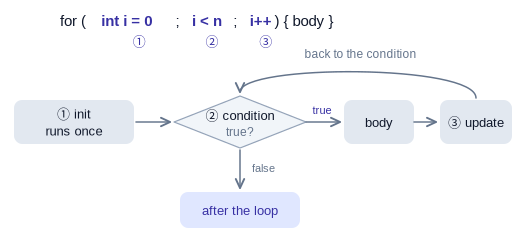
- To run through :
for (int i = 1; i <= 10; i++)(ori < 11). - To traverse a string or an array:
for (int i = 0; i < length; i++), since the indices are . - Backwards:
for (int i = length - 1; i >= 0; i--). - Steps other than 1:
for (int i = 0; i < 10; i += 2)gives 0, 2, 4, 6, 8.
Every for loop can be written as a while loop:
int i = 0;
while (i < n) {
    // body
    i++;
}
break and continue
breakleaves the loop immediately.continueskips the rest of the current iteration and goes on with the next one.
for (int i = 0; i < 10; i++) {
    if (i == 4) break;
    System.out.print(i + " ");    // 0 1 2 3
}

for (int i = 0; i < 10; i++) {
    if (i == 4) continue;
    System.out.print(i + " ");    // 0 1 2 3 5 6 7 8 9
}
Nested Loops
A loop inside a loop: the inner loop runs completely for every value of the outer loop.
for (int i = 0; i < 3; i++) {
    for (int j = 0; j < 2; j++) {
        System.out.println(i + "," + j);
    }
}| i | j | output |
|---|---|---|
| 0 | 0, 1 | 0,0 0,1 |
| 1 | 0, 1 | 1,0 1,1 |
| 2 | 0, 1 | 2,0 2,1 |
The body runs times.
Star patterns. The outer loop draws the rows; inside it, one loop prints the spaces and another prints the stars.
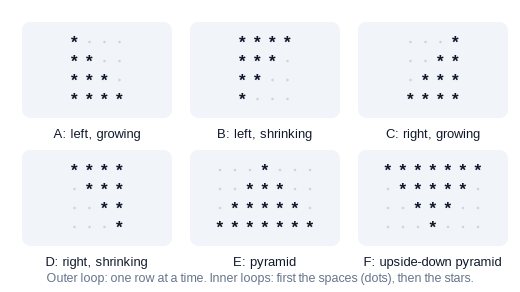
public static void patternA(int n) {
    for (int i = 0; i < n; i++) {          // row i
        for (int j = 0; j < i + 1; j++) {  // row i has i + 1 stars
            System.out.print("*");
        }
        System.out.println();
    }
}
For a right-aligned row, first print n - 1 - i spaces, then i + 1 stars.
Standard Algorithms
Palindrome check. A word is a palindrome if it reads the same backwards: aba, abba, abcdcba. Compare the character at index i with the one at index length - 1 - i:
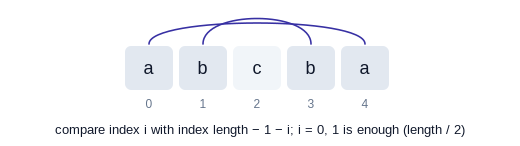
public static boolean isPalindrome(String s) {
    for (int i = 0; i < s.length() / 2; i++) {
        String front = s.substring(i, i + 1);
        String back = s.substring(s.length() - 1 - i, s.length() - i);
        if (!front.equals(back)) {
            return false;     // one mismatch is enough
        }
    }
    return true;              // no mismatch found
}
A common mistake is
if (same) return true; else return false;inside the loop: it decides after comparing only the first pair. Returnfalseearly, andtrueonly after the loop.
Counting occurrences. How many times does t occur in w?
public static int countIn(String w, String t) {
    int count = 0;
    for (int i = 0; i + t.length() <= w.length(); i++) {
        if (w.substring(i, i + t.length()).equals(t)) {
            count++;
        }
    }
    return count;
}
// countIn("abcabcabc", "ab") returns 3
Prime check. is prime if no number from 2 to divides it (it is enough to go up to ):
public static boolean isPrime(int n) {
    if (n < 2) return false;
    for (int i = 2; i * i <= n; i++) {
        if (n % i == 0) return false;   // divides exactly: not prime
    }
    return true;
}
Simulation. Toss two dice 100 times and count how often the total is at least 8:
int count = 0;
for (int k = 0; k < 100; k++) {
    int d1 = (int) (6 * Math.random() + 1);
    int d2 = (int) (6 * Math.random() + 1);
    if (d1 + d2 >= 8) count++;
}
System.out.println(count);   // about 42 on average, since P(total >= 8) = 15/36
Informal Run-Time Analysis
The AP exam asks how many times a statement runs. Count the iterations:
for (int i = 0; i < n; i++)runs times.for (int i = 0; i < n; i += 2)runs about times.- Two nested loops of iterations each run the inner body times.
- In the triangle pattern (inner loop up to
i + 1), the body runs times.
Unit 3: Class Creation
Writing Methods
We met methods in Unit 1 (Methods as Functions). In general, a method is a block of code that runs only when it is called. We write it once and use it many times.
public static double area(double r) {
    double a = Math.PI * r * r;
    return a;
}| Part | In the example | Meaning |
|---|---|---|
| access modifier | public |
who may call it (public or private) |
static |
static |
belongs to the class; can be called without an object |
| return type | double |
the type of the value it returns, or void |
| name | area |
an identifier, usually a verb |
| parameters | (double r) |
the inputs, with their types |
returngives the value back to the caller and ends the method at once.- A
voidmethod returns nothing;return;can still be used to stop it early. - A constructor (below) has no return type at all.
Calling it: System.out.println(area(1.2));. The program jumps into the method, runs it, and comes back with the returned value.
Parameters and Arguments
public static int multiply(int n, int m) {   // n and m: formal parameters
    return n * m;
}

multiply(3, 5);                              // 3 and 5: actual parameters (arguments)
The arguments must match the parameters in number, order and type.
Scope
The scope of a variable is the part of the code where it exists: from its declaration to the closing brace } of the block it was declared in. Inner blocks can see the variables of outer blocks, but not the other way round.
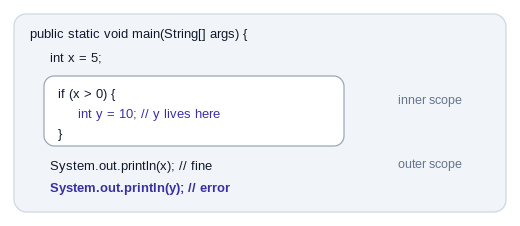
for (int i = 0; i < 3; i++) {
    System.out.println(i);
}
System.out.println(i);        // error: i only existed inside the for loop

int j = 0;                    // declared before the loop...
while (j < 3) { j++; }
System.out.println(j);        // ...so this works: prints 3

int a = 5;
{
    int a = 8;                // error: a is already defined in this scope
}
A parameter's scope is its method: x in printNum(int x) cannot be used in main.
Pass by Value
Java always passes a copy of the argument to the method.
public static void f(int x) {
    x++;
    System.out.println(x);   // 8
}
// in main:
int x = 7;
f(x);
System.out.println(x);       // 7: main's x was never changed
For a reference type the copy is a copy of the address, so the method works on the same object:
public static void g(int[] arr) {
    arr[0]++;
    System.out.println(arr[0]);   // 2
}
// in main:
int[] arr = {1, 2, 3};
g(arr);
System.out.println(arr[0]);       // 2: the array itself was changed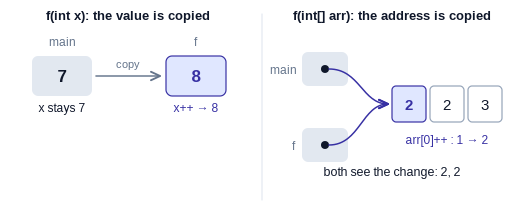
Method Overloading
Several methods may share a name if their signatures (the list of parameter types) differ:
public static int f(int n) { ... }
public static int f(int n, double d) { ... }
public static int f(double d, int n) { ... }   // different order of types: also allowed
Java chooses the method whose parameter types match the arguments. The return type alone cannot distinguish two methods.
Object-Oriented Programming
Procedural programming is about writing procedures that operate on data. Object-oriented programming (OOP) is about creating objects that contain both data and methods. OOP gives programs a clear structure, avoids repeating code (DRY: Don't Repeat Yourself), and makes code easier to maintain.
A class is a blueprint, like an ice-cube tray; the objects (instances) are the ice cubes made from it. All objects of a class have the same structure, but each has its own data.
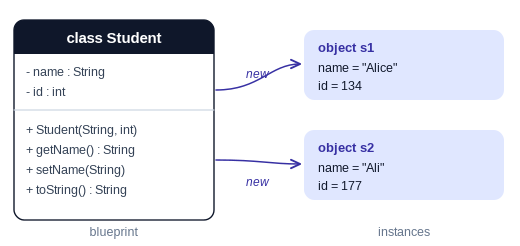
Anatomy of a Class
- Each class is written in its own file with the same name:
Student→Student.java. Class names start with a capital letter. - A class has data fields (attributes, instance variables) and methods:
- constructors create and set up a new object,
- accessors (getters) return the value of a field,
- mutators (modifiers, setters) change the value of a field,
- other helper methods.
- In AP CSA the data fields are always private.
public class Student {
    private String name;
    private int id;

    public Student(String objName, int objId) {   // constructor
        this.name = objName;
        this.id = objId;
    }

    public String getName() { return this.name; } // accessor
    public int getId() { return this.id; }

    public void setName(String objName) {         // mutator
        this.name = objName;
    }

    public String toString() {
        return name + " (" + id + ")";
    }
}
Student s1 = new Student("Alice", 134);
Student s2 = new Student("Ali", 177);
s2.setName("Ali Can");
System.out.println(s1.getName() + " " + s1.getId()); // Alice 134
System.out.println(s2); // Ali Can (177)Information hiding. If the fields were public, any code could write s1.id = 143; directly. We make them private and allow access only through methods, so the class controls its own data. For example, a setId method can reject negative numbers:
public void setId(int objId) {
    if (objId < 0) {
        System.out.println("Invalid student id");
        id = 0;
    } else {
        id = objId;
    }
}
With a public field, s1.id = -5; could not be stopped.
| Accessor | Mutator | |
|---|---|---|
| Purpose | returns the value of a field | changes the value of a field |
| Parameters | usually none | the new value |
| Return type | the type of the field | usually void |
| Usual name | getName() |
setName(...) |
Constructors
- A constructor has the same name as the class and no return type.
- It is called with
new:new Student("Alice", 134). - A class may have several constructors with different parameters (overloading).
- A constructor without parameters is called the default (no-argument) constructor; it sets the fields to reasonable first values:
public Student() {
    name = "";
    id = 0;
}
If a class has no constructor at all, Java supplies an empty one, and the fields get default values: 0 for int, 0.0 for double, false for boolean, and null for any reference type. As soon as we write any constructor, Java no longer supplies one.
The this Keyword
Inside a method, this refers to the object the method was called on. this.name = name; is needed when a parameter has the same name as a field: the left side is the field, the right side the parameter.
toString()
When an object must be turned into a string (for example in System.out.println(s1) or "Student: " + s1), Java calls its toString() method automatically. Without our own version, it prints the class name and a code derived from the address, such as Student@3fee733d. Writing a toString() method in the class gives a meaningful output instead.
Student s1 = new Student("Alice", 149);
System.out.println(s1);   // we want to see: Alice 149
Two ways to write it in the Student class: build the string step by step,
public String toString() {
    String rStr = "";
    rStr += this.name;
    rStr += " ";
    rStr += this.id;
    return rStr;
}
or return it in one line:
public String toString() {
    return this.name + " " + this.id;
}
Example: A Rational Number Class
The rational numbers are the fractions
This tells us what a Rational object needs: two data fields, the numerator num and the denominator den, and the rules for them:
- the denominator is positive, so the sign is kept in the numerator: , not ;
- and are not rational numbers: the denominator is never 0.
The class has constructors, accessors and mutators, the operations , and a toString() that shows the fraction as 1/2. We also want every rational number in its simplest form: is stored as .
Simplifying. To cancel a fraction, we divide the numerator and the denominator by their greatest common divisor (gcd):
To find the gcd of two positive integers a and b, try the numbers from the smaller of the two downwards; the first one that divides both is the gcd. If none is found, the gcd stays 1.
public static int gcd(int n, int m) {   // returns the gcd of n and m
    int g = 1;
    for (int i = min(n, m); i >= 1; i--) {
        if (n % i == 0 && m % i == 0) {
            g = i;
            break;          // the first divisor found is the greatest
        }
    }
    return g;
}

public static int min(int n, int m) {   // Math.min is not in the AP subset
    if (n < m) {
        return n;
    } else {
        return m;
    }
}
Addition.
With two objects Rational r1 = new Rational(...) and Rational r2 = new Rational(...), the method r1.add(r2) returns a new Rational for : its numerator is r1.num * r2.den + r2.num * r1.den and its denominator is r1.den * r2.den. Inside the method, r1 is this. Since addition is commutative, r1.add(r2) and r2.add(r1) give the same number.
public class Rational {
    private int num;
    private int den;

    public Rational() {                        // 0 = 0/1
        this.num = 0;
        this.den = 1;
    }

    public Rational(int objNum) {              // an integer n = n/1
        this.num = objNum;
        this.den = 1;
    }

    public Rational(int objNum, int objDen) {
        this.num = objNum;
        this.den = objDen;
        this.simplify();
    }

    // accessors
    public int getNum() { return this.num; }
    public int getDen() { return this.den; }

    public Rational add(Rational r2) {
        Rational result = new Rational();
        result.num = this.num * r2.den + this.den * r2.num;
        result.den = this.den * r2.den;
        result.simplify();
        return result;
    }

    private void simplify() {                  // only used inside the class
        int g = gcd(this.num, this.den);
        this.num /= g;
        this.den /= g;
    }

    public String toString() {
        return this.num + "/" + this.den;
    }

    // gcd and min as above
}
Rational r1 = new Rational(1, 2);
Rational r2 = new Rational(1, 3);
System.out.println(r1.add(r2)); // 5/6
System.out.println(new Rational(12, 16)); // 3/4simplify is private: it is a helper for the class itself, not part of what other code may call. add can use r2.den directly although den is private, because the code is inside the Rational class.
Negative numbers. The class above works for positive numbers. For negative ones three things must change:
- In the constructor, both signs negative cancel:
new Rational(-1, -2)should be . - A negative denominator moves its sign to the numerator: .
gcdmust be called withMath.abs(...)of the numbers: for negative numbers,min(n, m)is negative and the loop never runs.
simplify can do all three:
private void simplify() {
    if (this.den < 0) {          // 1/-2 -> -1/2 and -1/-2 -> 1/2
        this.num = -this.num;
        this.den = -this.den;
    }
    int g = gcd(Math.abs(this.num), this.den);
    this.num /= g;
    this.den /= g;
}
More Class Examples
Some more classes from the lectures. Each one shows a new idea.
Point2d: Methods That Return and Methods That Change
A point of the plane:
public class Point2d {
    private double x;
    private double y;
    private final double TL = 0.00001;   // tolerance for comparing doubles

    public Point2d() { x = y = 0; }
    public Point2d(double objX, double objY) {
        x = objX;
        y = objY;
    }

    public double getX() { return x; }
    public double getY() { return y; }
    public void setX(double objX) { x = objX; }
    public void setY(double objY) { y = objY; }

    public String toString() {
        return "(" + x + " , " + y + ")";
    }

    public double length() {             // distance from the origin
        return Math.sqrt(x * x + y * y);
    }

    public double slope() {              // slope of the line through the origin
        return y / x;
    }

    public void scalarProduct(double s) {   // changes this point
        x = x * s;
        y = y * s;
    }

    public void add(Point2d rp) {        // changes this point
        x += rp.getX();
        y += rp.getY();
    }

    public double distance(Point2d rp) {
        return Math.sqrt((x - rp.x) * (x - rp.x) + (y - rp.y) * (y - rp.y));
    }

    public boolean equals(Point2d r) {
        return Math.abs(x - r.x) < TL && Math.abs(y - r.y) < TL;
    }
}
Point2d p = new Point2d(3, 4);
Point2d q = new Point2d(1, 1);
System.out.println(p.length()); // 5.0
System.out.println(p.distance(q)); // 3.605551275463989
p.scalarProduct(2);
System.out.println(p); // (6.0 , 8.0)
p.add(q);
System.out.println(p); // (7.0 , 9.0)length,slopeanddistancereturn a value and leave the point unchanged.scalarProductandaddarevoid: they change the point they are called on. Comparep.add(q)here withr1.add(r2)of theRationalclass, which returns a new object and changes nothing.distanceusesrp.xdirectly, althoughxis private: private means private to the class, and this code is insidePoint2d.equalscompares doubles with a tolerance (see Doubles Are Approximate).TLis afinalfield: a constant of the class.slope()divides byx. For a point with the result isInfinityorNaN, not an error message; a careful version would check this first.
Circle: An Object Inside an Object
A circle is given by its radius and its center, and the center is a Point2d. A class may have fields whose type is another class: a circle has a center.
public class Circle {
    private double r;
    private Point2d center;

    public Circle() {                              // unit circle at the origin
        r = 1.0;
        center = new Point2d();
    }

    public Circle(double rObj, double x, double y) {
        r = rObj;
        center = new Point2d(x, y);
    }

    public Circle(double rObj, Point2d c) {
        r = rObj;
        center = c;
    }

    public double getR() { return r; }
    public Point2d getCenter() { return center; }
    public void setR(double rObj) { r = rObj; }
    public void setCenter(Point2d cObj) { center = cObj; }

    public void setCenter(double x, double y) {    // overloaded
        center.setX(x);
        center.setY(y);
    }

    public double area() { return Math.PI * r * r; }
    public double circ() { return 2 * Math.PI * r; }

    public String toString() {
        return "c: " + center + "\tr: " + r;       // calls center.toString()
    }
}
"\t" is the tab character.
Two circles, one center. The third constructor stores the address of
c, not a copy of the point:Point2d p = new Point2d(0, 0); Circle c1 = new Circle(1, p); Circle c2 = new Circle(5, p); c1.setCenter(3, 4); System.out.println(c2.getCenter()); // (3.0 , 4.0): c2 moved too! System.out.println(p); // (3.0 , 4.0): and so did p
c1,c2andpall refer to the samePoint2dobject. To avoid this, the constructor can make its own copy:center = new Point2d(c.getX(), c.getY());.
Date and Temperature
The same idea again: a temperature record has a date.
public class Date {
    private int day;
    private int month;
    private int year;

    public Date() {                    // 1/1/2000
        day = 1;
        month = 1;
        year = 2000;
    }

    public Date(int d, int m, int y) {
        day = d;
        month = m;
        year = y;
    }

    public int getDay() { return day; }
    public int getMonth() { return month; }
    public int getYear() { return year; }

    public String toString() {
        return day + "/" + month + "/" + year;
    }
}
public class Temperature {
private Date d;
private double high;
private double low;
public Temperature() {
d = new Date();
high = 0;
low = 0;
}
public Temperature(Date objD, double objLow, double objHigh) {
d = objD;
low = objLow;
high = objHigh;
}
public Date getDate() { return d; }
public double getHigh() { return high; }
public double getLow() { return low; }
public void setDate(Date objDate) { d = objDate; }
public void setLow(double objLow) { low = objLow; }
public void setHigh(double objHigh) { high = objHigh; }
public String toString() {
return d.toString() + "\tlow: " + low + "\thigh: " + high;
}
}Temperature t = new Temperature(new Date(24, 10, 2026), 11.5, 19.0);
System.out.println(t); // 24/10/2026 low: 11.5 high: 19.0Temperature does not need to know how a Date is stored: it only calls d.toString(). The Date class has no mutators yet; that is Exercise 50.
Elevator: Overloading a Mutator
public class Elevator {
    private int floor;
    private String motion;   // "u" up, "d" down, "s" stable

    public Elevator(int f, String m) {
        floor = f;
        motion = m;
    }

    public int getFloor() { return floor; }
    public String getMotion() { return motion; }
    public void setFloor(int f) { floor = f; }

    public void setMotion(String m) {
        motion = m;
    }

    public void setMotion(int m) {   // 1 up, -1 down, 0 stable
        if (m == 0) {
            motion = "s";
        } else if (m == -1) {
            motion = "d";
        } else if (m == 1) {
            motion = "u";
        } else {
            System.out.println("Not a valid integer direction value");
        }
    }

    public String toString() {
        if (motion.equals("s")) {
            return "The elevator is on the floor: " + floor;
        } else if (motion.equals("d")) {
            return "The elevator is going down";
        } else {
            return "The elevator is going up";
        }
    }

    public String toStringSummary() {   // a short version for a display: "3", "d" or "u"
        if (motion.equals("s")) {
            return "" + floor;          // "" + int turns the number into a String
        } else {
            return motion;
        }
    }
}
There are two setMotion methods: e.setMotion("u") and e.setMotion(1) do the same thing, and Java chooses the method by the type of the argument (Method Overloading). A class may also have more than one method that describes the object as a string: toString is the one Java calls automatically, toStringSummary has to be called by name.
Unit 4: Data Collections
Arrays
An array is a simple data structure: a fixed number of values of the same type (arrays are homogeneous), stored side by side and numbered from 0.
int[] arr;                 // declaration: arr is null for now
arr = new int[4];          // room for 4 ints, all 0 at first
arr[0] = 10;
arr[1] = 21;

double[] d = new double[5];          // five 0.0 values
String[] names = {"Ali", "Alice"};   // initializer list: size and values at once
int[] nums = {10, 20, -7};
Point2d[] parr = new Point2d[3];     // three null references
New arrays are filled with default values: 0, 0.0, false, or null. The size never changes after creation; it is arr.length (a field, so no parentheses, unlike length() of a String).
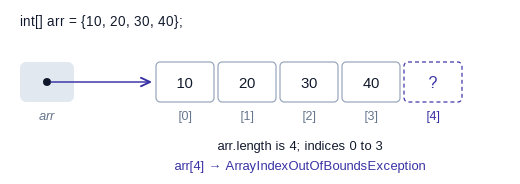
Traversing an Array
for (int i = 0; i < arr.length; i++) {
    arr[i] = i * i * i;              // we can read and change arr[i]
}
The enhanced for loop visits the values one by one, from index 0 to the end:
for (int n : arr) {
    System.out.println(n);
    n = n * 2;                       // changes only the copy n, NOT the array
}
Use it when you only need to read the values; to change elements, or when you need the index, use the ordinary for loop.
Be careful at the edges. When the algorithm looks at neighbours, adjust the bounds so that no index goes outside the array:
for (int i = 0; i < arr.length - 1; i++) {
    // compare arr[i] with arr[i + 1]
}
for (int i = 1; i < arr.length; i++) {
    // compare arr[i] with arr[i - 1]
}
for (int i = arr.length - 1; i >= 0; i--) {
    // backwards traversal
}
Static Utility Methods
Methods that we use again and again can be collected in one class of static methods, like the Math class. We call them with the class name: Utility.printArr(arr).
System.out.println(arr) prints only something like [I@1b6d3586 (the type and an address), so the first method prints the elements:
public class Utility {

    public static void printArr(int[] arr) {
        System.out.print("[ ");
        for (int i = 0; i < arr.length; i++) {
            System.out.print(arr[i] + " ");
        }
        System.out.println("]");
    }

    // an array of length len, filled with random integers in [rStart, rEnd]
    public static int[] randomArr(int len, int rStart, int rEnd) {
        int[] retArr = new int[len];
        int range = rEnd + 1 - rStart;
        for (int i = 0; i < len; i++) {
            retArr[i] = (int) (Math.random() * range + rStart);
        }
        return retArr;
    }
}int[] a = Utility.randomArr(5, 1, 6); // five dice
Utility.printArr(a); // for example [ 3 6 1 1 4 ]randomArr returns an array: the return type is int[]. It creates the array with new, fills it, and returns its address. The random part is the formula from Random Integers with Math.random().
Prime factors in an array. In Exercise 28 we printed the prime factors of . To return them instead, we need an array, but we do not know its size in advance. The solution is to go through the numbers twice: first only count the prime factors, then create an array of exactly that size and fill it.
public static boolean isPrime(int n) {
    if (n < 2) {
        return false;
    }
    for (int i = 2; i <= n / 2; i++) {
        if (n % i == 0) {
            return false;
        }
    }
    return true;
}

public static int[] primeFactors(int n) {     // primeFactors(120) returns {2, 3, 5}
    int counter = 0;
    for (int i = 2; i <= n; i++) {            // 1st pass: count
        if (n % i == 0 && isPrime(i)) {
            counter++;
        }
    }

    int[] retArr = new int[counter];
    for (int i = 2, j = 0; i <= n; i++) {     // 2nd pass: fill; j is the next free index
        if (n % i == 0 && isPrime(i)) {
            retArr[j] = i;
            j++;
        }
    }
    return retArr;
}
In the lecture the loops ran only up to
n / 2. That is enough to find the divisors of smaller than , but then a prime (2, 3, 7, …) gets an empty array, although its only prime factor is itself. Without the lineif (n < 2),isPrime(0)andisPrime(1)would returntrue.
An array of objects. For the full factorization we need pairs (base, power). A small class holds one pair:
public class Factor {
    private int base;
    private int power;

    public Factor(int b, int p) {
        base = b;
        power = p;
    }

    public String toString() {
        return base + "^" + power;
    }
}
and the method returns an array of Factor objects:
public static Factor[] primeFactorization(int n) {
    int[] pfArr = primeFactors(n);
    Factor[] retFactors = new Factor[pfArr.length];   // pfArr.length null references

    for (int i = 0; i < pfArr.length; i++) {
        int counter = 0;
        int divisor = pfArr[i];
        while (n % divisor == 0) {     // p, p^2, p^3, ... while they divide n
            counter++;
            divisor *= pfArr[i];
        }
        retFactors[i] = new Factor(pfArr[i], counter);
    }
    return retFactors;
}Factor[] f = Utility.primeFactorization(120);
for (Factor x : f) {
System.out.print(x + " "); // 2^3 3^1 5^1
}new Factor[3] creates an array of three null references, not three objects. Each object must still be created with new Factor(...) before it is used.
Binary Search
Linear search looks at the elements one by one until it finds the key; in an array of elements this takes up to steps. If the array is sorted, we can do much better: look at the middle element, and throw away the half where the key cannot be.
// returns an index of key in the sorted array arr, or -1 if key is not in arr
public static int binarySearch(int[] arr, int key) {
    int start = 0;
    int end = arr.length - 1;
    while (start <= end) {
        int mid = (start + end) / 2;
        if (arr[mid] == key) {
            return mid;
        } else if (arr[mid] < key) {
            start = mid + 1;       // key can only be in the right half
        } else {
            end = mid - 1;         // key can only be in the left half
        }
    }
    return -1;                     // start > end: nothing left to search
}
Searching for 40 in {10, 20, 30, 40, 50}:
| start | end | mid | arr[mid] | |
|---|---|---|---|---|
| 0 | 4 | 2 | 30 | 30 < 40: go right |
| 3 | 4 | 3 | 40 | found, returns 3 |
Searching for 550 in the same array: start moves to 3, then to 4, then to 5 > end, and the method returns −1.
Every step halves the part that is left, so an array of elements needs only about steps: 20 steps for a million elements, where linear search may need a million. Binary search works only on sorted arrays.
Two-Dimensional Arrays
A 2D array is a table of r rows and c columns; the element in row i and column j is arr[i][j]. In Java a 2D array is an array of 1D arrays: arr[0] is the whole first row.
int[][] arr2d = new int[2][3];                    // 2 rows, 3 columns, all 0
int[][] m = {{10, 20, 30}, {40, 50, 60}};
double[][] d = {{1.2, 3.4}, {3.2, 5.1}, {4.4, -3.3}};
boolean[][] b = {{true, false, false}, {true, true, false}};arr.lengthis the number of rows,arr[0].lengthis the number of columns.
We traverse with nested loops. Java stores the table row by row, so the usual order is row-major: i for rows outside, j for columns inside. Swapping the loops gives column-major order.
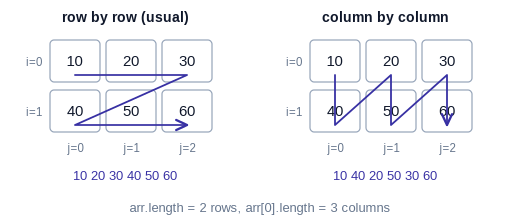
for (int i = 0; i < arr.length; i++) {           // rows
    for (int j = 0; j < arr[0].length; j++) {    // columns
        // arr[i][j]
    }
}

for (int j = 0; j < arr[0].length; j++) {        // column-major
    for (int i = 0; i < arr.length; i++) {
        // arr[i][j]
    }
}
Example. Fill a 5×5 table with i * j and print it as a table:
int[][] t = new int[5][5];
for (int i = 0; i < t.length; i++) {
    for (int j = 0; j < t[0].length; j++) {
        t[i][j] = i * j;
    }
}
for (int i = 0; i < t.length; i++) {
    for (int j = 0; j < t[0].length; j++) {
        System.out.print(t[i][j] + " ");
    }
    System.out.println();
}
Coming Later in Unit 4
ArrayList, standard algorithms on collections, sorting (selection, insertion and merge sort), recursion, and reading data from text files.
Exam Tips
- Trace code with a table of variables; most multiple-choice questions are tracing questions.
int / intis integer division; a cast changes the type of what is directly after it.- Compare strings and other objects with
equals, doubles with a tolerance, and only primitives with==. substring(from, to)excludesto; the last index islength() - 1; arrays uselength, stringslength().- Negate compound conditions with De Morgan: switch
&&and||and negate each part. - Declare collecting variables (sums, counts) before the loop.
- In free-response questions, use the method headers exactly as given, and do not print when the question asks you to return.
Quiz 1: Variables, Operators and Strings
25 multiple-choice questions in the style of the AP Computer Science A exam. Each question has exactly one correct answer. No calculator and no computer: trace the code by hand, as you will on the exam. Suggested time: 45 minutes.
1. What is printed as a result of executing the following code segment?
System.out.print("AP");
System.out.println("CS");
System.out.print("A");- (A)
APCSAon a single line - (B)
APCSon the first line andAon the second line - (C)
APon the first line andCSAon the second line - (D)
AP,CS, andAon three separate lines
2. Which of the following best describes how a Java program is run?
- (A) The source code is translated directly into machine code for one specific processor.
- (B) The source code is executed line by line by the operating system without being compiled.
- (C) The compiler translates the source code into bytecode, which is then executed by the Java Virtual Machine.
- (D) The Java Virtual Machine translates the bytecode back into source code and then executes it.
3. A student writes a program that is supposed to print the average of three test scores. The program compiles and runs without crashing, but it divides the sum of the scores by 2 instead of 3. Which kind of error is this?
- (A) A syntax error
- (B) A run-time error
- (C) An overflow error
- (D) A logic error
4. What is the value of the following expression?
7 / 2 * 2.0- (A)
6.0 - (B)
7.0 - (C)
6 - (D)
7
5. What is printed as a result of executing the following code segment?
double result = (double) (7 / 2) + 7 / 2.0;
System.out.println(result);- (A)
7.0 - (B)
6.0 - (C)
6.5 - (D)
3.5
6. What is printed as a result of executing the following code segment?
int x = 17;
System.out.println(x % 5 + x / 5);- (A)
3 - (B)
5 - (C)
5.4 - (D)
7
7. Consider the following three statements.
int a = 3.0;          // Statement I
double d = 5;         // Statement II
int b = (int) 4.9;    // Statement III
Which of the statements compile without error?
- (A) I only
- (B) II only
- (C) I and II only
- (D) II and III only
8. Assume that d is a double variable holding a negative value. Which of the following expressions evaluates to d rounded to the nearest integer?
- (A)
(int) (d - 0.5) - (B)
(int) (d + 0.5) - (C)
(int) d - 1 - (D)
(int) d + 0.5
9. What is printed as a result of executing the following code segment?
int a = 4;
int b = 9;
a = b;
b = a;
System.out.println(a + " " + b);- (A)
4 9 - (B)
9 4 - (C)
9 9 - (D)
4 4
10. What is printed as a result of executing the following code segment?
int n = 5283;
System.out.println(n % 100 / 10);- (A)
2 - (B)
3 - (C)
5 - (D)
8
11. What is the value of x after the following code segment is executed?
int x = 10;
x += 5;
x /= 4;
x *= 2;
x %= 4;- (A)
2 - (B)
3 - (C)
6 - (D)
7
12. What is printed as a result of executing the following code segment?
int n = 5072;
int count = 0;
while (n > 0) {
    if (n % 10 > 4) {
        count++;
    }
    n /= 10;
}
System.out.println(count);- (A)
1 - (B)
2 - (C)
3 - (D)
4
13. What is printed as a result of executing the following code segment?
int x = Integer.MAX_VALUE;
x = x + 1;
System.out.println(x == Integer.MIN_VALUE);- (A) Nothing is printed, because the code does not compile.
- (B) Nothing is printed, because a run-time error occurs.
- (C)
true - (D)
false
14. A certain system stores integers with 8 bits using two's complement. What is the range of values that can be stored?
- (A) 0 to 255
- (B) -128 to 127
- (C) -127 to 128
- (D) -256 to 255
15. Assume that a and b are double variables that hold the results of earlier calculations. Which of the following is the most appropriate way to test whether they should be considered equal?
- (A)
a == b - (B)
a.equals(b) - (C)
(int) a == (int) b - (D)
Math.abs(a - b) < 0.0001
16. Consider the following declarations and expressions.
int x = 7;
int y = 3;
I. x > 5 || y > 5
II. !(x < y) && y != 3
III. x % y == 1 && x / y == 2
Which of the expressions evaluate to true?
- (A) I only
- (B) I and II only
- (C) I and III only
- (D) I, II, and III
17. Assume that a and b are int variables. Which of the following is equivalent to the expression below?
!(a >= 5 && b != 0)- (A)
a < 5 || b == 0 - (B)
a < 5 && b == 0 - (C)
a <= 5 || b == 0 - (D)
a >= 5 || b != 0
18. Assume that x and y are boolean variables. Which of the following is equivalent to the expression below?
!(x || !y)- (A)
!x || y - (B)
!x && y - (C)
x && !y - (D)
!x && !y
19. What is the value of the following expression?
2 + 3 * 4 % 5 - 1- (A)
-1 - (B)
0 - (C)
1 - (D)
3
20. What is printed as a result of executing the following code segment?
String s = "Computer Science";
System.out.println(s.substring(3, 7));- (A)
pute - (B)
puter - (C)
mput - (D)
mpute
21. What is printed as a result of executing the following code segment?
String s = "banana";
System.out.println(s.indexOf("an") + s.indexOf("x"));- (A)
-1 - (B)
1 - (C)
0 - (D)
2
22. Consider the following declaration.
String s = "java";Which of the following method calls causes a StringIndexOutOfBoundsException?
- (A)
s.substring(4) - (B)
s.substring(0, 4) - (C)
s.substring(2, 2) - (D)
s.substring(3, 5)
23. What does the following method call return?
"apple".compareTo("Apple")- (A) A negative number
- (B) A positive number
- (C) Zero
- (D) Nothing, because the call causes a run-time error
24. What is printed as a result of executing the following code segment?
String a = "cs";
String b = new String("cs");
System.out.println((a == b) + " " + a.equals(b));- (A)
false true - (B)
true true - (C)
true false - (D)
false false
25. What is printed as a result of executing the following code segment?
String s = "abcde";
String r = "";
for (int i = 0; i < s.length(); i += 2) {
    r = s.substring(i, i + 1) + r;
}
System.out.println(r);- (A)
ace - (B)
edcba - (C)
eca - (D)
bd
Answer key
| Question | Answer | Why |
|---|---|---|
| 1 | B | print stays on the line, and println ends the line after CS. |
| 2 | C | .java is compiled to bytecode (.class), and the JVM runs it. |
| 3 | D | The program runs but gives a wrong result. |
| 4 | A | 7 / 2 is integer division, 3, and then 3 * 2.0 is 6.0. |
| 5 | C | (double) (7 / 2) is 3.0 and 7 / 2.0 is 3.5. |
| 6 | B | 17 % 5 is 2 and 17 / 5 is 3. |
| 7 | D | A double cannot be stored in an int without a cast. |
| 8 | A | For negative numbers we subtract 0.5 before truncating. |
| 9 | C | After a = b the value 4 is lost, so both are 9. |
| 10 | D | n % 100 is 83, and 83 / 10 is 8. |
| 11 | A | 10, 15, 3, 6, and finally 6 % 4 is 2. |
| 12 | B | The digits are 2, 7, 0, 5, and two of them (7 and 5) are greater than 4. |
| 13 | C | The value overflows and wraps around to Integer.MIN_VALUE. |
| 14 | B | With 8 bits the range is . |
| 15 | D | Doubles are compared with a tolerance. |
| 16 | C | In II, y != 3 is false. |
| 17 | A | De Morgan: "and" becomes "or", >= becomes <, and != becomes ==. |
| 18 | B | De Morgan gives !x && !(!y), which is !x && y. |
| 19 | D | 3 * 4 is 12, 12 % 5 is 2, and 2 + 2 - 1 is 3. |
| 20 | A | Indices 3, 4, 5, 6 are p, u, t, e. Index 7 is excluded. |
| 21 | C | The first match of an is at index 1, and no match gives -1. |
| 22 | D | The end index 5 is greater than the length 4. |
| 23 | B | Lowercase letters come after uppercase letters. |
| 24 | A | == compares addresses, and equals compares the text. |
| 25 | C | The letters a, c, e are each added to the front of r. |
Quiz 2: Selection and Iteration
20 multiple-choice questions on Unit 2: boolean expressions, if statements and loops. Trace each code segment by hand. Suggested time: 35 minutes.
1. What is printed as a result of executing the following code segment?
int x = 7;
if (x > 5) {
    System.out.print("A");
} else if (x > 3) {
    System.out.print("B");
} else {
    System.out.print("C");
}- (A)
B - (B)
AB - (C)
C - (D)
A
2. What is printed as a result of executing the following code segment?
int x = 7;
if (x > 5) {
    System.out.print("A");
}
if (x > 3) {
    System.out.print("B");
} else {
    System.out.print("C");
}- (A)
A - (B)
AB - (C)
AC - (D)
ABC
3. Assume that x and y are int variables. Which of the following is equivalent to the expression below?
!(x > 3 && y <= 5)- (A)
x < 3 || y > 5 - (B)
x <= 3 && y > 5 - (C)
x <= 3 || y > 5 - (D)
x > 3 || y <= 5
4. What is printed as a result of executing the following code segment?
int count = 0;
int total = 10;
if (count != 0 && total / count > 2) {
    System.out.println("high");
} else {
    System.out.println("low");
}- (A)
high - (B)
low - (C) Nothing, because an
ArithmeticExceptionis thrown - (D) Nothing, because the code does not compile
5. What is printed as a result of executing the following code segment?
int sum = 0;
for (int i = 1; i <= 10; i += 3) {
    sum += i;
}
System.out.println(sum);- (A)
22 - (B)
12 - (C)
55 - (D)
21
6. How many times is * printed by the following code segment?
for (int i = 0; i < 4; i++) {
    for (int j = i; j < 4; j++) {
        System.out.print("*");
    }
}- (A) 16
- (B) 6
- (C) 4
- (D) 10
7. What is printed as a result of executing the following code segment?
int n = 0;
while (n < 20) {
    n += 6;
}
System.out.println(n);- (A)
18 - (B)
20 - (C)
24 - (D)
30
8. What is printed as a result of executing the following code segment?
for (int i = 1; i < 10; i++) {
    if (i % 4 == 0) {
        break;
    }
    System.out.print(i);
}- (A)
123 - (B)
1234 - (C)
12356789 - (D)
123567
9. What is printed as a result of executing the following code segment?
for (int i = 1; i <= 6; i++) {
    if (i % 2 == 0) {
        continue;
    }
    System.out.print(i + " ");
}- (A)
2 4 6 - (B)
1 3 5 - (C)
1 2 3 - (D)
1
10. Which of the following loops never ends?
- (A)
for (int i = 0; i < 10; i++) { } - (B)
int i = 10; while (i > 0) { i -= 3; } - (C)
int i = 0; while (i != 9) { i += 2; } - (D)
for (int i = 5; i > 0; i--) { }
11. What is printed as a result of executing the following code segment?
String s = "banana";
int count = 0;
for (int i = 0; i < s.length(); i++) {
    if (s.substring(i, i + 1).equals("a")) {
        count++;
    }
}
System.out.println(count);- (A)
2 - (B)
6 - (C)
0 - (D)
3
12. What is the value of r after the following code segment is executed?
String s = "abcd";
String r = "";
for (int i = s.length() - 1; i >= 0; i--) {
    r += s.substring(i, i + 1);
}- (A)
"abcd" - (B)
"dcba" - (C)
"dcb" - (D) Nothing, because a
StringIndexOutOfBoundsExceptionis thrown
13. What is the value of b after the following code segment is executed?
int a = 5;
boolean b = a > 3 || a / 0 == 1;- (A)
false - (B) Nothing, because an
ArithmeticExceptionis thrown - (C)
true - (D) Nothing, because the code does not compile
14. What is printed as a result of executing the following code segment?
int x = 10;
int y = 20;
if (x > y) {
    x = y;
} else if (y > 15) {
    y = x;
} else {
    x = 0;
}
System.out.println(x + " " + y);- (A)
10 10 - (B)
20 20 - (C)
0 20 - (D)
10 20
15. Assume that n is a positive int. Which code segment prints the digits of n from right to left?
- (A)
while (n > 0) { System.out.print(n / 10); n %= 10; } - (B)
while (n >= 0) { System.out.print(n % 10); n /= 10; } - (C)
for (int i = 0; i < n; i++) { System.out.print(n % 10); } - (D)
while (n > 0) { System.out.print(n % 10); n /= 10; }
16. How many times does the body of the following loop run?
for (int i = 0; i < 20; i += 4) {
    // body
}- (A) 4
- (B) 5
- (C) 6
- (D) 20
17. Consider the following method, which is supposed to check whether s is a palindrome.
public static boolean check(String s) {
    for (int i = 0; i < s.length() / 2; i++) {
        String front = s.substring(i, i + 1);
        String back = s.substring(s.length() - 1 - i, s.length() - i);
        if (front.equals(back)) {
            return true;
        } else {
            return false;
        }
    }
    return true;
}
What does check("abca") return?
- (A)
true - (B)
false - (C) Nothing, because an exception is thrown
- (D) Nothing, because the method does not compile
18. What is printed as a result of executing the following code segment?
int x = 10;
if (x > 2 && x < 5 || x == 10) {
    System.out.print("yes");
} else {
    System.out.print("no");
}- (A)
no - (B)
yesno - (C) Nothing, because the code does not compile
- (D)
yes
19. Assume that n is an int. Which condition is true exactly when n is a two-digit positive number (from 10 to 99)?
- (A)
n >= 10 || n <= 99 - (B)
n > 10 && n < 99 - (C)
n >= 10 && n < 100 - (D)
!(n < 10 && n > 99)
20. What is printed as a result of executing the following code segment?
for (int i = 1; i <= 3; i++) {
    for (int j = 1; j <= i; j++) {
        System.out.print(j);
    }
    System.out.print(" ");
}- (A)
1 22 333 - (B)
123 123 123 - (C)
1 12 123 - (D)
111 22 3
Answer key
| Question | Answer | Why |
|---|---|---|
| 1 | D | In an if / else if / else chain only the first true branch runs. |
| 2 | B | These are two separate if statements: the first prints A, the second prints B. |
| 3 | C | De Morgan: && becomes ||, > becomes <=, <= becomes >. |
| 4 | B | count != 0 is false, so the division is never evaluated (short circuit). |
| 5 | A | i is 1, 4, 7, 10, and 1 + 4 + 7 + 10 = 22. |
| 6 | D | The inner loop runs 4, 3, 2, 1 times: 10 in total. |
| 7 | C | n becomes 6, 12, 18, 24; the loop stops when n is no longer below 20. |
| 8 | A | At i = 4, break ends the loop before 4 is printed. |
| 9 | B | continue skips the even numbers. |
| 10 | C | i takes only even values, so it is never equal to 9. |
| 11 | D | "banana" has three as. |
| 12 | B | The characters are added from the last to the first. |
| 13 | C | a > 3 is true, so || does not evaluate the right-hand side. |
| 14 | A | x > y is false and y > 15 is true, so y becomes 10. |
| 15 | D | n % 10 is the last digit and n /= 10 removes it; (B) never ends because 0 stays 0. |
| 16 | B | i is 0, 4, 8, 12, 16. |
| 17 | A | It returns after comparing only the first pair (a and a): a classic bug. |
| 18 | D | && is evaluated first: (true && false) || true is true. |
| 19 | C | (A) and (D) are always true; (B) excludes 10 and 99. |
| 20 | C | Row i prints the numbers from 1 to i. |
Quiz 3: Methods, Classes and Arrays
20 multiple-choice questions on Units 3 and 4: writing methods, scope, pass by value, classes, arrays and 2D arrays. Suggested time: 35 minutes.
1. Which is a correct header for a method that takes two int values and returns their average as a double?
- (A)
public static average(int a, int b) double - (B)
public static void average(int a, int b) - (C)
public static double average(int a, int b) - (D)
public double static average(a, b)
2. Consider the following method.
public static int mystery(int n) {
    n = n * 2;
    return n + 1;
}
What is printed as a result of executing the following code segment?
int n = 5;
int m = mystery(n);
System.out.println(n + " " + m);- (A)
5 11 - (B)
10 11 - (C)
11 11 - (D)
5 6
3. Consider the following method.
public static void change(int[] a) {
    a[1] = a[0] + a[2];
}
What is printed as a result of executing the following code segment?
int[] arr = {3, 4, 5};
change(arr);
System.out.println(arr[1]);- (A)
4 - (B)
8 - (C)
9 - (D)
12
4. Which of the following code segments does not compile?
- (A)
int x = 1; if (x > 0) { int y = 2; x = y; } - (B)
for (int i = 0; i < 3; i++) { } System.out.println(i); - (C)
int i = 0; while (i < 3) { i++; } System.out.println(i); - (D)
int a = 5; { int b = a + 1; System.out.println(b); }
5. Which pair of methods can not both appear in the same class?
- (A)
void f(int a)andvoid f(double a) - (B)
void f(int a, double b)andvoid f(double a, int b) - (C)
int f(int a)anddouble f(int a) - (D)
void f()andvoid f(int a)
6. The class Student has a private field name and a public method getName() that returns it. In another class, s refers to a Student object. Which statement compiles?
- (A)
s.name = "Ali"; - (B)
String n = s.name; - (C)
String n = Student.getName(); - (D)
String n = s.getName();
7. Which of the following statements about constructors is true?
- (A) A constructor has the same name as its class.
- (B) A constructor has the return type
void. - (C) Every class must define a constructor without parameters.
- (D) A constructor is called with the dot operator, as in
obj.Student().
8. Consider the following class.
public class Point {
    private int x;
    private double y;
    private String label;

    public Point() { }
}
After Point p = new Point();, what are the values of x, y and label?
- (A)
0,0.0,null - (B)
0,0.0,"" - (C) They have no values, so using them causes an error.
- (D) The code does not compile, because the constructor is empty.
9. The only constructor of the class Box is public Box(int size). What happens when the statement Box b = new Box(); is compiled?
- (A) A box of size 0 is created.
- (B) A compile-time error occurs.
- (C) A run-time error occurs.
- (D)
bis set tonull.
10. Consider the following class.
public class Counter {
    private int count;

    public Counter(int count) {
        count = count;
    }

    public int getCount() {
        return count;
    }
}
What does new Counter(5).getCount() return?
- (A)
5 - (B)
null - (C)
0 - (D) Nothing, because the class does not compile
11. The class Student does not define a toString method. What does System.out.println(s) print, where s refers to a Student object?
- (A) The values of all the fields of
s - (B) Something like
Student@3fee733d - (C) Nothing
- (D) Nothing, because the statement does not compile
12. What is printed as a result of executing the following code segment?
int[] a = new int[5];
a[2] = 7;
System.out.println(a[1] + a[2] + a.length);- (A)
7 - (B)
75 - (C) Nothing, because an
ArrayIndexOutOfBoundsExceptionis thrown - (D)
12
13. What is printed as a result of executing the following code segment?
int[] a = {2, 4, 6, 8};
for (int i = 1; i < a.length; i++) {
    a[i] = a[i] + a[i - 1];
}
System.out.println(a[3]);- (A)
14 - (B)
20 - (C)
8 - (D)
12
14. What is printed as a result of executing the following code segment?
int[] a = {1, 2, 3};
for (int x : a) {
    x = x * 10;
}
System.out.println(a[0] + a[1] + a[2]);- (A)
6 - (B)
60 - (C)
123 - (D)
0
15. Assume int[] a = new int[4];. Which statement throws an ArrayIndexOutOfBoundsException?
- (A)
a[0] = 1; - (B)
a[a.length - 1] = 1; - (C)
a[a.length] = 1; - (D)
a[3] = a[0];
16. A method finds the largest value in an int array a that may contain negative numbers. Which is the correct way to start?
- (A)
int max = 0; - (B)
int max = a[0]; - (C)
int max = a.length; - (D)
int max = -1;
17. What is printed as a result of executing the following code segment?
int[][] m = {{1, 2, 3}, {4, 5, 6}};
System.out.println(m.length + " " + m[0].length + " " + m[1][2]);- (A)
2 3 6 - (B)
3 2 6 - (C)
2 3 5 - (D)
3 2 2
18. What is the value of sum after the following code segment is executed?
int[][] m = {{1, 2, 3}, {4, 5, 6}, {7, 8, 9}};
int sum = 0;
for (int i = 0; i < m.length; i++) {
    sum += m[i][i];
}- (A)
12 - (B)
45 - (C)
6 - (D)
15
19. What is printed as a result of executing the following code segment?
int[][] m = {{1, 2}, {3, 4}, {5, 6}};
for (int j = 0; j < m[0].length; j++) {
    for (int i = 0; i < m.length; i++) {
        System.out.print(m[i][j]);
    }
}- (A)
123456 - (B)
135246 - (C)
214365 - (D)
654321
20. Which best describes a method with the header public void setBalance(double b)?
- (A) An accessor that returns the balance
- (B) A constructor
- (C) A mutator that changes the balance and returns nothing
- (D) A static method that belongs to the class
Answer key
| Question | Answer | Why |
|---|---|---|
| 1 | C | Access modifier, static, return type, name, then the typed parameters. |
| 2 | A | The method changes only its own copy of n; it returns 11. |
| 3 | B | The method works on the same array: a[1] becomes 3 + 5. |
| 4 | B | i exists only inside the for loop. |
| 5 | C | Same name and same parameter types; the return type alone does not distinguish them. |
| 6 | D | name is private, and getName is called on an object, not on the class. |
| 7 | A | Constructors have the class's name and no return type, not even void. |
| 8 | A | Fields get default values: 0, 0.0 and null. |
| 9 | B | Once a class has a constructor, Java no longer supplies the empty one. |
| 10 | C | count = count assigns the parameter to itself; the field stays 0. It should be this.count = count. |
| 11 | B | Without toString, Java prints the class name and a hash code. |
| 12 | D | 0 + 7 + 5. |
| 13 | B | The array becomes 2, 6, 12, 20 (running totals). |
| 14 | A | The enhanced for changes only the copy x, not the array. |
| 15 | C | Valid indices are 0 to a.length - 1. |
| 16 | B | With 0 or −1, an array of smaller negative numbers gives a wrong maximum. |
| 17 | A | 2 rows, 3 columns, and row 1, column 2 is 6. |
| 18 | D | The main diagonal: 1 + 5 + 9. |
| 19 | B | Column by column: 1, 3, 5, then 2, 4, 6. |
| 20 | C | A setter (mutator) changes a field and usually returns nothing. |
Quiz 4: Integer Arithmetic and Assignment
25 multiple-choice questions on Unit 1: integer division and %, operator precedence, compound assignment and final. Trace each code segment by hand. Suggested time: 40 minutes.
1. What is printed by the following statement?
System.out.print(12 / 5 * 2);- (A)
2 - (B)
4.8 - (C)
4 - (D)
0
2. What is printed as a result of executing the following code segment?
int m = 5;
m *= 2 + 3;
System.out.print(m);- (A)
25 - (B)
13 - (C)
15 - (D)
10
3. What is the value of the following expression?
4 + 8 * 3 / 4 + 5 % 2- (A)
5 - (B)
11 - (C)
12 - (D)
6
4. Assume that a, b and c are int variables with the values 90, 5 and 4. What is the value of x after the following statement?
int x = a / b / c;- (A)
4.5 - (B)
90 - (C)
72 - (D)
4
5. What value is stored in result after the following statement?
int result = 13 - 3 * 6 / 4 % 3;- (A)
12 - (B)
0 - (C)
13 - (D)
-1 - (E)
-5
6. Suppose that addition and subtraction had higher precedence than multiplication and division (operators of equal precedence still being evaluated from left to right). What would the value of the following expression be?
2 + 3 * 12 / 7 - 4 + 8- (A)
11 - (B)
12 - (C)
9 - (D)
5 - (E)
-4
7. What is printed when the following statement is executed?
System.out.println(17 / 5 % 3 + 17 * 5 % 3);- (A)
9 - (B)
4 - (C)
1 - (D)
42 - (E)
42.5
8. What is printed when the following program is run?
public class Main {
    public static void main(String[] args) {
        int a = 5;
        int b = 2;
        int c = a * b + a / b - a % b;
        System.out.println(c);
    }
}- (A)
8 - (B)
11 - (C)
10 - (D)
9 - (E)
12
9. The following code segment compiles, but causes a run-time error. Which exception is thrown?
int a = 16, b = 0;
double c = a / b;- (A)
IndexOutOfBoundsException - (B)
DivisionByZeroException - (C)
ArithmeticException - (D)
NullPointerException - (E)
TypeMismatchException
10. An algorithm finds the average of N numbers with average = sum / N, where N and sum are both int variables. The programmer forgot to check whether N is zero. If N is zero, when will the error be detected?
- (A) At compile time
- (B) At edit time
- (C) As soon as the value of
Nis entered - (D) During run time
- (E) When an incorrect result is output
11. What is printed as a result of executing the following code segment?
int x = -17;
int y = 5;
System.out.println(x / y + " " + x % y);- (A)
-3 -2 - (B)
-4 3 - (C)
-4 -2 - (D)
-3 3
12. What is printed as a result of executing the following code segment?
int x = 23;
int y = -4;
System.out.println(x % y);- (A)
-3 - (B)
3 - (C)
1 - (D)
-1
13. Assume that x is a positive integer. Which of the following could not be the value of i after the following statement executes?
int i = x % 50;- (A)
0 - (B)
10 - (C)
25 - (D)
50
14. What is printed as a result of executing the following code segment?
int x = 2;
int y = 4;
x += y;
y += x;
System.out.println("x = " + x + ", y = " + y);- (A)
x = 2, y = 4 - (B)
x = 6, y = 10 - (C)
x = 6, y = 6 - (D)
x = 6, y = 12
15. What is printed as a result of executing the following code segment?
int n = 6;
n += n * 2;
n -= n / 4;
System.out.println(n);- (A)
14 - (B)
16 - (C)
18 - (D)
12
16. What is printed as a result of executing the following code segment?
int x = 17;
int y = 4;
x = x / y + x % y;
y = x * y - 3;
System.out.println(x + " " + y);- (A)
4 13 - (B)
5 20 - (C)
5 17 - (D)
8 29
17. The following code segment is intended to swap the values of a and b without a temporary variable. What is printed when it executes?
int a = 12;
int b = 5;
a = a - b;
b = a + b;
a = b - a;
System.out.println(a + " " + b);- (A)
12 5 - (B)
7 12 - (C)
7 5 - (D)
5 12
18. What is printed as a result of executing the following code segment?
int n = 1234;
int d1 = n / 1000;
int d2 = n / 100 % 10;
int d3 = n / 10 % 10;
int d4 = n % 10;
System.out.println(d4 * 1000 + d3 * 100 + d2 * 10 + d1);- (A)
1234 - (B)
3214 - (C)
4312 - (D)
4321
19. What is printed as a result of executing the following code segment?
int x = 47;
int a = x / 10;
int b = x % 10;
int y = b * 10 + a;
int z = y / 10 + y % 10;
System.out.println(z);- (A)
47 - (B)
11 - (C)
74 - (D)
12
20. What is printed as a result of executing the following code segment?
int a = 5, b = 3, c = 2;
int r1 = a + b * c;
int r2 = (a + b) * c;
int r3 = r2 - r1;
int r4 = r1 * r3 / r2;
System.out.println(r4 + " " + (r1 + r2 + r3));- (A)
3 32 - (B)
3 33 - (C)
4 32 - (D)
3 31
21. What is printed as a result of executing the following code segment?
int a = 88;
a = a / 6;
a = a / 4;
a = a * 4 * 6;
System.out.println(a);- (A)
84 - (B)
88 - (C)
72 - (D)
3
22. What is printed as a result of executing the following code segment?
int myValue = 17;
int multiplier = 3;
int answer = myValue % multiplier + myValue / multiplier;
answer = answer * multiplier;
System.out.println(answer);- (A)
9 - (B)
21 - (C)
7 - (D)
30 - (E)
10
23. What happens when the following code is compiled and run?
public static void main(String[] args) {
    final int z;
    z = 20;
    z = 30;
    System.out.println(z);
}- (A) A compile-time error occurs.
- (B)
30 - (C)
20 - (D) Nothing is printed.
24. After which of the following code segments does the variable hold the value 2?
// I
int x = 0;
x++;
x += x;

// II
int y = 4;
y++;
y /= 2;

// III
int z = 4;
z += 2;
z /= 2;- (A) I only
- (B) II only
- (C) III only
- (D) I and II only
25. Suppose a, b and c are positive integers less than 1000, and x satisfies a / b = c / x. The int value d is obtained by truncating x to an integer. Which of the following code segments correctly compute d?
// I
d = c * b / a;

// II
int temp = c * b;
d = temp / a;

// III
int temp = b / a;
d = c * temp;- (A) I only
- (B) II only
- (C) I and II only
- (D) II and III only
Answer key
| Question | Answer | Why |
|---|---|---|
| 1 | C | 12 / 5 is integer division, 2; then 2 * 2 is 4. |
| 2 | A | The right side is evaluated first: m = m * (2 + 3), so 5 · 5 = 25. |
| 3 | B | 8 * 3 / 4 is 6 (left to right), 5 % 2 is 1, and 4 + 6 + 1 = 11. |
| 4 | D | Left to right: 90 / 5 is 18, then 18 / 4 is 4 (integer division). |
| 5 | A | 3 * 6 / 4 % 3 is 18 / 4 % 3, that is 4 % 3 = 1, and 13 − 1 = 12. |
| 6 | D | With + and - first: (2 + 3) · 12 / (7 − 4 + 8) = 5 · 12 / 11 = 60 / 11 = 5. |
| 7 | C | 17 / 5 % 3 is 3 % 3 = 0, and 17 * 5 % 3 is 85 % 3 = 1. |
| 8 | B | a * b is 10, a / b is 2 and a % b is 1: 10 + 2 − 1 = 11. |
| 9 | C | a / b divides two ints, and integer division by zero throws an ArithmeticException; the double on the left does not help. |
| 10 | D | The code compiles; the division by zero only happens, and throws an exception, when the program runs. |
| 11 | A | Integer division truncates towards zero: −17 / 5 = −3. The remainder has the sign of the left operand: −17 % 5 = −2. |
| 12 | B | The sign of % follows the left operand: 23 = (−5)(−4) + 3. |
| 13 | D | x % 50 is the remainder after dividing by 50, so it is between 0 and 49. |
| 14 | B | x becomes 2 + 4 = 6, then y becomes 4 + 6 = 10. |
| 15 | A | n becomes 6 + 12 = 18, then 18 − 18 / 4 = 18 − 4 = 14. |
| 16 | C | x = 4 + 1 = 5, then y = 5 · 4 − 3 = 17. |
| 17 | D | a = 7, then b = 7 + 5 = 12, then a = 12 − 7 = 5: the values really are swapped. |
| 18 | D | d1 to d4 are 1, 2, 3, 4, and the expression puts them back in reverse order. |
| 19 | B | a = 4 and b = 7, so y = 74 and z = 7 + 4 = 11. |
| 20 | A | r1 = 11, r2 = 16, r3 = 5, r4 = 55 / 16 = 3, and 11 + 16 + 5 = 32. |
| 21 | C | 88 / 6 = 14 and 14 / 4 = 3; multiplying back gives 3 · 24 = 72, not 88. |
| 22 | B | 17 % 3 = 2 and 17 / 3 = 5, so answer is 7, and 7 · 3 = 21. |
| 23 | A | A final variable can be assigned only once; the second assignment z = 30; does not compile. |
| 24 | D | I gives 1 + 1 = 2, II gives 5 / 2 = 2, III gives 6 / 2 = 3. |
| 25 | C | I and II compute (c · b) / a, which is x truncated. III computes b / a first, which truncates too early (often to 0). |
Quiz 5: Casting, Doubles and Rounding
24 multiple-choice questions on Unit 1: mixing int and double, casting, rounding, compile-time errors and overflow. Trace each code segment by hand. Suggested time: 40 minutes.
1. What is the value of val after the following statement?
double val = (double) 15 / 4;- (A)
3.75 - (B)
3.0 - (C)
3 - (D)
4.0
2. Consider the following declarations.
int p = 5;
int q = 3;
I. (double) p * (double) q / 2
II. (double) (p * q / 2)
III. (double) (p / 2) * q
Which of the expressions evaluate to 7.5?
- (A) I only
- (B) II only
- (C) I and II only
- (D) I, II, and III
- (E) None of them
3. What is printed when the following statements are executed?
double x = 2.5, y = 1.99;
System.out.println(((int) (x / y) + (int) (x * y)));- (A)
0 - (B)
3 - (C)
5 - (D)
4.0 - (E)
4
4. The variables below hold the sum of all scores and the number of games played.
int sum = /* the sum of all the scores */;
int count = /* the number of games played */;
Which statement correctly computes the average score?
- (A)
double average = sum / count; - (B)
double average = double (sum / count); - (C)
double average = (double) (sum / count); - (D)
double average = (double) sum / count; - (E)
double average = sum / double (count);
5. What is printed as a result of executing the following code segment?
int count = 5;
double multiplier = 2.5;
int answer = (int)(count * multiplier);
answer = (answer * count) % 10;
System.out.println(answer);- (A)
2.5 - (B)
0 - (C)
6 - (D)
12.5 - (E)
60
6. What is the value of the following expression?
(int) (5 + 2 / 3 + 1)- (A)
5 - (B)
6 - (C)
6.67 - (D)
7 - (E)
0
7. A student expects the following code segment to print 1 / 4 = 0.25, but it prints 1 / 4 = 0.0.
double myDouble = 1/4;
System.out.println("1 / 4 = " + myDouble);
Which replacement for the first line prints 1 / 4 = 0.25?
- (A)
int myDouble = 1/4; - (B)
double myDouble = (int) 1/4; - (C)
double myDouble = (double) 1/4; - (D)
double myDouble = (int) (1.0/4.0);
8. A teacher has computed gradeAverage as a double. For report cards it must be rounded to the nearest whole number, with .5 rounded up. Which of the following does this correctly?
- (A)
int rcGrade = (int) (gradeAverage + 0.5); - (B)
int rcGrade = gradeAverage % 0.5; - (C)
int rcGrade = (int) gradeAverage + 0.5; - (D)
int rcGrade = (int) gradeAverage; - (E)
int rcGrade = (int) gradeAverage - 0.5;
9. The following code segment is intended to print 8.
int x = 23;
double y = 3;
System.out.println((int)(x / y));
What is printed, and why?
- (A) 7, because
xandyare integers, so23 / 3evaluates to 7 - (B) 8, because
x / yis 7.666… and the cast tointrounds it to 8 - (C) 8, because
xandyare integers, so23 / 3evaluates to 8 - (D) 7, because
x / yis 7.666… and the cast tointtruncates it to 7
10. What is printed as a result of executing the following code segment?
int a = 5;
int b = 2;
double c = 3.0;
System.out.println(5 + a / b * c - 1);- (A)
0.6666666666667 - (B)
9.0 - (C)
11.5 - (D)
10.0 - (E)
14.0
11. What is printed as a result of executing the following code segment?
double valOne = 5.75;
double valTwo = 2.75;
int x = (int) valOne + (int) valTwo;
int y = (int) (valOne + valTwo);
System.out.println(x + "" + y);- (A)
78 - (B)
77 - (C)
79 - (D)
98 - (E)
99
12. What is printed as a result of executing the following code segment?
int r = 23;
int t = 10;
double a = r % t;
double b = r / t;
System.out.println(a + " " + b);- (A)
2.0 3.0 - (B)
2.3 3.0 - (C)
3.0 2.0 - (D)
3.0 2.3 - (E) Nothing is printed: a compile-time error occurs, because an
intvalue cannot be assigned to adouble.
13. Which of the following pairs of declarations cause a compile-time error?
// I
double x = 14.7;
int y = x;

// II
double x = 14.7;
int y = (int) x;

// III
int x = 14;
double y = x;- (A) None
- (B) I only
- (C) II only
- (D) III only
- (E) I and III only
14. The programmer wants the following code to print 13 / 5 = 2.6, but it prints 13 / 5 = 2.0.
double answer = 13 / 5;
System.out.println("13 / 5 = " + answer);
Which of the following replacements for the first line will not fix the problem?
- (A)
double answer = (double) 13 / 5; - (B)
double answer = (double) (13 / 5); - (C)
double answer = 13.0 / 5; - (D)
double answer = 13 / (double) 5;
15. What is printed as a result of executing the following code segment?
int a = 10;
double b = 3.7;
int c = 4;
int x = (int) (a + b);
double y = (double) a / c;
double z = (double) (a / c);
double w = x + y + z;
System.out.println(w);- (A)
17.5 - (B)
15 - (C)
15.5 - (D)
17 - (E)
10
16. What is printed as a result of executing the following code segment?
double q = 15.0;
int r = 2;
double x = (int) (q / r);
double y = q / r;
System.out.println(x + " " + y);- (A)
7.0 7.0 - (B)
7.5 7.0 - (C)
7.0 7.5 - (D)
7.5 7.5
17. Line 3 of the following code segment does not compile.
int a = 10;
double b = 10.7;
int d = a + b;
I. int d = (int) a + b;
II. int d = (int) (a + b);
III. int d = a + (int) b;
Which of the statements could replace line 3 so that the code compiles?
- (A) II only
- (B) III only
- (C) I and III only
- (D) II and III only
18. What is printed as a result of executing the following code segment?
int a = 11;
int b = 4;
double x = 11;
double y = 4;
System.out.print(a / b);
System.out.print(", ");
System.out.print(x / y);
System.out.print(", ");
System.out.print(a / y);- (A)
3, 2.75, 2.75 - (B)
2, 3, 2 - (C) Nothing is printed, because of a compile-time error.
- (D)
2, 2.75, 2.75
19. Consider the following code segment, where a and b are positive.
int a = /* a positive value */;
int b = /* a positive value */;
if (/* missing condition */) {
    int result = a + b;
}
Which of the following should replace /* missing condition */ so that a + b does not overflow?
- (A)
a + b < Integer.MAX_VALUE - (B)
Integer.MAX_VALUE - a >= b - (C)
Integer.MIN_VALUE + a <= b - (D)
Integer.MAX_VALUE - a <= b - (E)
a + b <= Integer.MAX_VALUE
20. What is printed as a result of executing the following code segment?
int x = 7, y = 2;
double a = x / y;
double b = 1.0 * x / y;
System.out.println(a + " " + b + " " + (a == b));- (A)
3.5 3.5 true - (B)
3.0 3.0 true - (C)
3.0 3.5 false - (D)
3.5 3.5 false
21. What is the value of z after the following code segment is executed?
double x = 3.6;
double y = 2;
int a = 5, b = 13;
double z = x + y * b / a;- (A)
4.6 - (B)
8.8 - (C)
8.6 - (D)
7.6 - (E)
14.56
22. Assume that x is a double variable. Which is true of the following boolean expression?
3.0 == x * (3.0 / x)- (A) It may evaluate to
falsefor some values ofx. - (B) It will always evaluate to
false. - (C) It will evaluate to
falseonly whenxis zero. - (D) It will evaluate to
falseonly whenxis very large or very close to zero. - (E) It will always evaluate to
true.
23. What value is stored in x after the following code segment executes?
int a = 9;
int b = 4;
double x = a / b + (a + b) / 2.0;- (A)
9.0 - (B)
8.75 - (C)
8.0 - (D)
8.5
24. What value is stored in y after the following code segment executes?
int x = 17;
double y = x / 5 + x / 5.0;- (A)
6.4 - (B)
6.0 - (C)
3.4 - (D)
6.8
Answer key
| Question | Answer | Why |
|---|---|---|
| 1 | A | The cast applies to 15 only, so the division is 15.0 / 4 = 3.75. |
| 2 | A | I is 15.0 / 2 = 7.5. In II the integer division 15 / 2 = 7 happens before the cast; III is 2.0 · 3 = 6.0. |
| 3 | C | (int) (2.5 / 1.99) = (int) 1.256… = 1 and (int) (2.5 * 1.99) = (int) 4.975 = 4. |
| 4 | D | Cast sum before dividing. (double) (sum / count) casts an already truncated result, and double (...) is not Java syntax. |
| 5 | B | (int) 12.5 is 12, then 12 · 5 = 60 and 60 % 10 = 0. |
| 6 | B | 2 / 3 is 0 (integer division), so the value is (int) 6 = 6. |
| 7 | C | The cast makes 1 a double before the division: 1.0 / 4 = 0.25. |
| 8 | A | Adding 0.5 and then truncating rounds to the nearest whole number; the cast must apply to the whole sum. |
| 9 | D | y is a double, so x / y is 7.666…; a cast truncates, it does not round. |
| 10 | D | a / b is 2 (integer division), 2 · 3.0 = 6.0, and 5 + 6.0 − 1 = 10.0. |
| 11 | A | x = 5 + 2 = 7 and y = (int) 8.5 = 8; x + "" + y joins them as text: 78. |
| 12 | C | Both are int operations, 23 % 10 = 3 and 23 / 10 = 2; stored in doubles they become 3.0 and 2.0. |
| 13 | B | An int cannot hold a double without a cast. II casts, and III widens an int to a double, which is allowed. |
| 14 | B | In (double) (13 / 5) the integer division gives 2 before the cast, so the result is still 2.0. |
| 15 | A | x = (int) 13.7 = 13, y = 10.0 / 4 = 2.5, z = (double) 2 = 2.0, and 13 + 2.5 + 2.0 = 17.5. |
| 16 | C | x = (int) 7.5 = 7, stored as 7.0; y = 15.0 / 2 = 7.5. |
| 17 | D | In I the cast applies only to a, so (int) a + b is still a double. II casts the sum, III casts b before adding. |
| 18 | D | 11 / 4 is integer division, 2; the other two divisions involve a double: 2.75. |
| 19 | B | a + b itself would overflow before the comparison, so the test is rearranged: a + b ≤ MAX exactly when MAX − a ≥ b, and MAX − a cannot overflow. |
| 20 | C | x / y is integer division, 3, stored as 3.0; 1.0 * x / y is 3.5. |
| 21 | B | y is a double, so y * b / a = 26.0 / 5 = 5.2, and 3.6 + 5.2 = 8.8. |
| 22 | A | Doubles are approximate: 3.0 / x is rounded, and multiplying it back by x does not always give exactly 3.0. |
| 23 | D | 9 / 4 = 2 (integer division) and 13 / 2.0 = 6.5. |
| 24 | A | 17 / 5 = 3 and 17 / 5.0 = 3.4. |
Quiz 6: Strings, the Math Class and Methods
25 multiple-choice questions: string concatenation, print and println, substring and indexOf, the Math class and random integers, and calling methods. Trace each code segment by hand. Suggested time: 40 minutes.
1. What is printed by the following statement?
System.out.print("5" + 3 + 2);- (A)
55 - (B)
532 - (C)
10 - (D) An error occurs.
2. What is printed as a result of executing the following code segment?
int x = 2;
System.out.print("" + x + x);- (A)
22 - (B)
4 - (C)
4.0 - (D) An error occurs.
3. Consider the following three statements.
I. System.out.print(12 * 100 + 34);
II. System.out.print("12" + 34);
III. System.out.print(1 + "2" + 3 + 4);
Which of the statements print 1234?
- (A) None of them
- (B) I only
- (C) I and II only
- (D) II and III only
- (E) I, II, and III
4. What is printed by the following statement?
System.out.println(1 + 2 + "+" + 3 + 4 + "=" + (3 + 4));- (A)
3+34=34 - (B)
3+7=7 - (C)
3+34=7 - (D)
12+3+4=7
5. What is printed as a result of executing the following code segment?
String label = "AP";
int n = 3;
System.out.println(label + (n + 2) + n / 2);- (A)
AP32 - (B)
AP52 - (C)
AP53 - (D)
AP51
6. What is printed as a result of executing the following code segment?
int a = 100, b = 3;
int q = a / b;
int r = a % b;
String s = "" + q + r + (q + r);
System.out.println(s);- (A)
331 - (B)
3334 - (C)
33134 - (D)
68
7. How many lines are printed by the following code segment?
System.out.println("Hello");
System.out.println(" World");
System.out.print("Welcome to");
System.out.print("Java.");- (A)
1 - (B)
2 - (C)
3 - (D)
4
8. Assume that no variable named side1 has been declared. Which of the following statements does not compile?
- (A)
System.out.print(side1); - (B)
System.out.print("1"); - (C)
System.out.print(1); - (D)
System.out.print("side1");
9. What value is stored in p after the following code segment executes?
String s = "2026Exam";
String r = s.substring(4) + s.substring(0, 4);
int p = r.indexOf("a");- (A)
0 - (B)
1 - (C)
-1 - (D)
2
10. What value is stored in t after the following code segment executes?
String s = "Advanced Placement";
int n = s.length() - s.indexOf("P");
String t = s.substring(s.length() - n);- (A)
"Advanced" - (B)
"Placement" - (C)
"ement" - (D)
"d Placement"
11. What is the result of executing the following code segment?
String s = null;
String t = "value: " + s;
System.out.println(t + "!");- (A) The line
value: null!is printed. - (B) A
NullPointerExceptionis thrown on the second line. - (C) The line
value: !is printed. - (D) The code does not compile, because
nullcannot be assigned to aString.
12. Which of the following expressions produces a random integer from 5 to 10, both included?
- (A)
(int)(Math.random() * 5) + 5 - (B)
(int)(Math.random() * 10) + 1 - (C)
(int)(Math.random() * 6) + 5 - (D)
(int)(Math.random() * 5) + 6
13. Which of the following expressions produces a random integer from −5 to 5, both included?
- (A)
(int)(Math.random() * 10) - 5 - (B)
(int)(Math.random() * 11) - 6 - (C)
(int)(Math.random() * 10) - 4 - (D)
(int)(Math.random() * 11) - 5
14. Which of the following expressions produces a random even integer from 5 to 14, both included?
- (A)
(int)(Math.random() * 10) + 5 - (B)
(int)(Math.random() * 5) * 2 + 6 - (C)
(int)(Math.random() * 4) * 2 + 6 - (D)
(int)(Math.random() * 5 * 2) + 6
15. What is the value of the following expression?
(int) (Math.pow(3, 4) / Math.sqrt(9))- (A)
9 - (B)
81 - (C)
3 - (D)
27
16. What is the value of the following expression?
(int) Math.abs(Math.pow(-2.5, 2) - Math.sqrt(49))- (A)
6 - (B)
2 - (C)
0 - (D)
18
17. What is printed as a result of executing the following code segment?
int a = -8, b = 3;
int result = Math.abs(a) % b + Math.abs(a + b);
System.out.println(result);- (A)
6 - (B)
7 - (C)
8 - (D)
13
18. What is printed as a result of executing the following code segment?
int a = 58;
int b = a / 10 + a % 10;
int c = b * b;
double d = Math.sqrt(c - 25);
System.out.println(b + " " + d);- (A)
13 12.0 - (B)
11 12.0 - (C)
13 144.0 - (D)
58 12.0
19. What is printed as a result of executing the following code segment?
int p = 50, q = 8;
int d = p / q;
int r = p % q;
double val = Math.pow(d, r) - Math.pow(r, d - r * 2);
System.out.println(val);- (A)
28.0 - (B)
34.0 - (C)
32.0 - (D)
36.0
20. Assume that x is a positive double. A student's program evaluates Math.pow(x, 0.5) == Math.sqrt(x) and gets false, although in mathematics. What is the most likely reason?
- (A)
Math.powreturns anint, whileMath.sqrtreturns adouble. - (B) There is round-off error in computing
powandsqrt. - (C) The computer stores floating-point numbers with 32-bit words.
- (D)
xwas imprecisely calculated in a previous statement. - (E) There is overflow error in computing
pow.
21. Consider the following method.
public static int f(int a, int b, int c) {
    return Math.abs(a - b) + Math.abs(b - c) + Math.abs(a - c);
}
What is returned by f(1, 5, 3)?
- (A)
6 - (B)
9 - (C)
4 - (D)
8
22. Consider the following method.
public static int compute(int value) {
    double squared = Math.pow(value, 2);
    return (int)(squared / 2) + value % 3;
}
What value is returned by compute(5)?
- (A)
14 - (B)
13 - (C)
12 - (D)
15
23. Consider the following methods.
public static int square(int n) {
    return n * n;
}

public static int compute(int x, int y) {
    return square(x + y) - square(x) - square(y);
}
What value is returned by compute(3, 4)?
- (A)
49 - (B)
0 - (C)
24 - (D)
14
24. Consider the following methods.
public static void modify(int number, String text) {
    number = number * 2;
    text = text + "!";
}

public static void display() {
    int value = 7;
    String message = "hello";
    modify(value, message);
    System.out.println(value + message);
}
What is printed when display() is called?
- (A)
14hello! - (B)
7hello - (C)
7hello! - (D)
14hello
25. Consider the following method and code segment.
public static void change(int x, int[] a) {
    x = x + 10;
    a[0] = a[0] + 10;
}

// code segment
int n = 5;
int[] arr = {5};
change(n, arr);
System.out.println(n + " " + arr[0]);
What is printed when the code segment executes?
- (A)
5 15 - (B)
5 5 - (C)
15 5 - (D)
15 15
Answer key
| Question | Answer | Why |
|---|---|---|
| 1 | B | Left to right: "5" + 3 is "53", then "53" + 2 is "532". |
| 2 | A | The string comes first, so each x is joined as text: "" + 2 + 2 is "22". |
| 3 | E | I: 1200 + 34 = 1234. II: "12" + 34 is "1234". III: 1 + "2" is "12", then "123", then "1234". |
| 4 | C | 1 + 2 = 3 is computed first; after the "+" everything is joined as text, except (3 + 4) in parentheses. |
| 5 | D | After the string, (n + 2) = 5 is joined as text, and so is n / 2 = 1 (/ is done before +). |
| 6 | C | q = 33 and r = 1; after "" each value is joined as text: "33" + "1" + "34". |
| 7 | C | println ends the line, print does not: Hello, World, Welcome toJava. |
| 8 | A | side1 without quotes is a variable name, and no such variable exists. |
| 9 | D | r is "Exam2026", and its first a is at index 2. |
| 10 | B | indexOf("P") is 9 and the length is 18, so n = 9 and t = s.substring(9). |
| 11 | A | Joining null with a string gives the text null; no method is called on s, so there is no exception. |
| 12 | C | Math.random() * 6 lies in [0, 6), so the cast gives 0 to 5, and adding 5 gives 5 to 10. |
| 13 | D | There are 11 integers from −5 to 5: (int) (Math.random() * 11) gives 0 to 10, and subtracting 5 gives −5 to 5. |
| 14 | B | (int) (Math.random() * 5) gives 0 to 4; doubling and adding 6 gives 6, 8, 10, 12, 14. |
| 15 | D | 3⁴ = 81.0 and √9 = 3.0, and 81.0 / 3.0 = 27.0. |
| 16 | C | (−2.5)² = 6.25 and √49 = 7.0; |6.25 − 7.0| = 0.75, and the cast gives 0. |
| 17 | B | |−8| % 3 = 2 and |−8 + 3| = 5. |
| 18 | A | b = 5 + 8 = 13, c = 169, and √(169 − 25) = √144 = 12.0. |
| 19 | C | d = 6 and r = 2, so 6² − 2^(6 − 4) = 36 − 4 = 32.0. |
| 20 | B | Both methods compute an approximation of the root; the two approximations need not be exactly the same double. |
| 21 | D | |1 − 5| + |5 − 3| + |1 − 3| = 4 + 2 + 2 = 8. |
| 22 | A | 5² / 2 = 12.5, cast to 12, plus 5 % 3 = 2. |
| 23 | C | (3 + 4)² − 3² − 4² = 49 − 9 − 16 = 24. |
| 24 | B | Java passes copies: modify changes only its own number and text, so value and message stay 7 and "hello". |
| 25 | A | x is a copy of n, so n stays 5; a holds the address of the same array, so arr[0] becomes 15. |
Programming Exercises
Write your solution on paper first, trace it with a table, and only then type and run it. The exercises are grouped by topic, in the order the topics are taught.
Each exercise is marked with what you have to write:
- Method one or more methods with exactly the headers given. A method that has to find or compute something returns it; it does not print it. Test each method by calling it from
mainwith the examples given. - Class a whole class in its own file, as in Unit 3.
Use this template for the method exercises. Your methods go above main, and main only calls them and prints the results:
public class Exercises {
// Exercise 5
public static int reverse(int n) {
int rev = 0;
// ... your code ...
return rev;
}
public static void main(String[] args) {
System.out.println(reverse(3276)); // expected: 6723
System.out.println(reverse(4554)); // expected: 4554
}
}If you want to test with your own values, read them with a Scanner in main and pass them to the method; the method itself never reads input.
Arithmetic, Casting and Rounding
Exercise 1: Seconds to Hours, Minutes, Seconds
Method
public static String formatDuration(int totalSeconds)Return the duration totalSeconds (not negative) in hours, minutes and seconds, using only / and %.
formatDuration(3725) // returns "1 hour(s) 2 minute(s) 5 second(s)"
formatDuration(59) // returns "0 hour(s) 0 minute(s) 59 second(s)"Exercise 2: Average Grade Calculator and Manual Rounding
Method
public static double average(int totalPoints, int numTests)
public static int roundedAverage(int totalPoints, int numTests)average returns the exact decimal average. roundedAverage returns it rounded to the nearest whole number without any built-in method such as Math.round(); it may call average.
average(453, 5) // returns 90.6
roundedAverage(453, 5) // returns 91
roundedAverage(452, 5) // returns 90Exercise 3: Extracting Whole and Decimal Parts
Method
public static int wholePart(double d)
public static double fractionalPart(double d)For a positive double, return its whole-number part and its fractional part.
wholePart(12.75) // returns 12
fractionalPart(12.75) // returns 0.75Exercise 4: Rounding to Two Decimal Places
Method
public static double roundTo2(double price)Return the positive number price rounded to two decimal places, using only arithmetic and casting.
roundTo2(12.3456) // returns 12.35
roundTo2(7.996) // returns 8.0Hint: how did we round to a whole number? What happens if you multiply by 100 first?
Exercise 5: Reversing a Four-Digit Number
Method
public static int reverse(int n)
public static boolean isPalindrome(int n)For a four-digit positive integer n, reverse builds its reverse as an int (not as a String). isPalindrome returns whether n reads the same backwards; it should call reverse.
reverse(3276) // returns 6723
isPalindrome(3276) // returns false
isPalindrome(4554) // returns trueThe Math Class and Random Numbers
Exercise 6: Floating-Point Equality (Double Tolerance)
Method
public static boolean almostEqual(double a, double b, double tolerance)Return true if the absolute difference of a and b is less than or equal to tolerance.
almostEqual(4.3 - 3.1, 1.2, 0.0001) // returns true
almostEqual(1.5, 1.6, 0.01) // returns falseExercise 7: Random Odd Numbers
Method
public static int randomOdd()Return a random odd number between 1 and 100. In main, call it ten times and print the results, one per line.
Hint: the odd numbers are for . Choose a random first, then build the odd number from it (in the lecture we did the same for even numbers: ((int) (50 * Math.random()) + 1) * 2).
Exercise 8: Random Numbers of the Form 1, 4, 7, 10, …
Method
public static int randomFrom147()Return a random number from the list (every number of the form up to 100).
Hint: first shrink the interval: how many numbers are in the list, and which belongs to each of them? Choose a random , then scale and shift.
Exercise 9: Random Character Generator
Method
public static char randomUpper()
public static char randomLower()Return a random uppercase letter (A–Z) and a random lowercase letter (a–z), using Math.random() and type casting.
Hint: (char) 65 is 'A' and (char) 97 is 'a'.
Exercise 10: Random Integer in a Range
Method
public static int randomInt(int m, int n)Return a random integer between m and n, both included. Test it by calling it 10 000 times with m = 1, n = 6 and counting how often each value appears.
Booleans and if Statements
Exercise 11: Security Clearance System (De Morgan's Sandbox)
Method
public static boolean canEnter(boolean hasBadge, boolean isAdmin, boolean isWeekend)
public static boolean deniedWithNot(boolean hasBadge, boolean isAdmin, boolean isWeekend)
public static boolean deniedDeMorgan(boolean hasBadge, boolean isAdmin, boolean isWeekend)An employee may enter the server room only if:
- the employee is an admin (
isAdminis true), or - the employee has a badge (
hasBadgeis true) and it is not the weekend (!isWeekend).
canEnter returns whether access is granted. The other two return whether access is denied: deniedWithNot with a single ! in front of the whole condition, deniedDeMorgan with De Morgan's laws applied, so that ! stands only in front of single variables. Check in main that the two always agree, for all 8 combinations.
canEnter(true, false, false) // returns true
canEnter(true, false, true) // returns false
deniedDeMorgan(true, false, true) // returns trueExercise 12: Leap Year Checker
Method
public static boolean isLeapYear(int year)A year is a leap year if it is divisible by 4 but not by 100, unless it is also divisible by 400.
isLeapYear(2024) // returns true
isLeapYear(1900) // returns false
isLeapYear(2000) // returns trueExercise 13: Maximum of Three Numbers
Method
public static int max3(int x, int y, int z)
public static int max3NoAnd(int x, int y, int z)
public static int max3Math(int x, int y, int z)Each returns the largest of the three numbers, in a different way:
max3: anif / else if / elsechain with conditions such asx >= y && x >= z.max3NoAnd: no&&; keep the largest value seen so far in a variablemaxand compare it with each number in turn.max3Math: withMath.max. (Math.maxis not in the AP subset, but it is useful to know.)
In main, read three integers with a Scanner and print the result of all three methods. Test with ties, for example 5 5 2 and 7 7 7.
max3(5, 9, 2) // returns 9
max3(7, 7, 7) // returns 7Exercise 14: 6-Digit Password Validator
Method
public static boolean isValidPassword(int password)The password is valid only if both of the following hold:
- It is a 6-digit number (between 100000 and 999999, inclusive).
- The sum of the digits in the odd positions (1st, 3rd and 5th digits from the left) and the sum of the digits in the even positions (2nd, 4th and 6th) leave the same remainder when divided by 6.
isValidPassword(123459) // 1+3+5 = 9 and 2+4+9 = 15, both leave 3: returns true
isValidPassword(123456) // 9 and 12 leave 3 and 0: returns false
isValidPassword(12345) // only 5 digits: returns falseStrings
Exercise 15: Email Domain Extractor
Method
public static String getDomain(String email)Return the part of email immediately after the @ symbol, or the empty string "" if there is no @.
getDomain("student@school.edu") // returns "school.edu"
getDomain("school.edu") // returns ""Exercise 16: Splitting an Email Address
Method
public static boolean isValidEmail(String email)
public static String getUser(String email)isValidEmail returns false if email has no @, or if @ is its first or last character. getUser returns the part before @ (you may assume that the email is valid). In main, print Invalid email address for an invalid email; otherwise print the user name and the domain (Exercise 15) on separate lines.
isValidEmail("student@school.edu") // returns true
isValidEmail("@school.edu") // returns false
getUser("student@school.edu") // returns "student"Exercise 17: Counting a Letter
Method
public static int countLetter(String text, String target)
public static int lastIndex(String text, String target)target is a one-letter string. countLetter returns how many times it appears in text; lastIndex returns the index of its last occurrence, or −1 if there is none.
countLetter("mississippi", "s") // returns 4
lastIndex("mississippi", "s") // returns 6
lastIndex("mississippi", "z") // returns -1Exercise 18: Vowel Counter
Method
public static int countVowels(String s)Return the number of vowels (A, E, I, O, U, both upper and lower case) in s.
countVowels("Programming in JAVA") // returns 6Exercise 19: Reverse a String
Method
public static String reverse(String s)Return s backwards, built with a loop, without any built-in reverse method.
reverse("java") // returns "avaj"Exercise 20: Palindrome Word Check
Method
public static boolean isPalindrome(String word)Return whether word reads the same backwards as forwards. Letter case should not matter.
isPalindrome("Level") // returns true
isPalindrome("java") // returns falseExercise 21: Anagram Checker
Method
public static boolean isAnagram(String a, String b)Return whether a and b contain exactly the same letters the same number of times, ignoring spaces and letter case.
isAnagram("Listen", "Silent") // returns true
isAnagram("Dormitory", "dirty room") // returns true
isAnagram("java", "jar") // returns falseExercise 22: Remove Non-Alphanumeric Characters
Method
public static String onlyAlphanumeric(String s)Return a new string that contains only the letters and digits of s, in the same order.
onlyAlphanumeric("Hi, there! 2026") // returns "Hithere2026"Exercise 23: Counting a Substring
Method
public static int countIn(String source, String target)Return how many times target occurs in source. Use only length, substring, equals and indexOf.
countIn("abcabcabcs", "ab") // returns 3Should countIn("aaaa", "aa") return 2 or 3? Decide, and make your code do what you decided.
Loops
Exercise 24: Sum of the Digits of a Number
Method
public static int digitSum(int n)Return the sum of the digits of the positive integer n.
digitSum(1378) // returns 19Exercise 25: Half of the Reversed Integer
Method
public static int reverseDigits(int n)
public static double halfOfReverse(int n)reverseDigits reverses the order of the digits of the positive integer n mathematically (any number of digits, no Strings). halfOfReverse returns exactly half of the reversed number as a decimal.
reverseDigits(1230) // returns 321
halfOfReverse(123) // returns 160.5Exercise 26: Binary to Decimal
Method
public static int binaryToDecimal(String bin)Return the value of the binary number bin.
binaryToDecimal("1101") // returns 13Hint: traverse the string from the right; the digit at position from the right is worth .
Exercise 27: Prime Numbers
Method
public static boolean isPrime(int n)
public static void printPrimesBelow(int n)isPrime returns true if n is prime (careful with 0 and 1). printPrimesBelow uses it to print all primes below n on one line; it is a void method, because its job is to print.
isPrime(97) // returns true
isPrime(1) // returns false
printPrimesBelow(20) // prints 2 3 5 7 11 13 17 19Exercise 28: Prime Factors
Method
public static void primeFactors(int n)Print the distinct prime factors of n on one line. You may use isPrime from Exercise 27. (In Unit 4 we write a version that returns them in an array: Static Utility Methods.)
primeFactors(15) // prints 3 5
primeFactors(120) // prints 2 3 5
primeFactors(13) // prints 13Exercise 29: Prime Factorization
Method
public static void primeFactorization(int n)Print each prime factor of n with its power, since :
primeFactorization(120) prints
2 -> 3
3 -> 1
5 -> 1
Exercise 30: Dice Simulation
Method
public static int countHighTotals(int tosses)Simulate tossing two dice tosses times and return how many times the total is at least 8. In main, call it with 100 and with 100 000 tosses, and compare the proportion countHighTotals(100000) / 100000.0 with the exact probability .
Exercise 31: Drawing Shapes with Nested Loops
Method
public static void patternA(int numRows)
// ... up to
public static void patternF(int numRows)Six void methods that print the six star patterns shown in the figure in Nested Loops above, with numRows rows:
- Part A: left-aligned, growing
- Part B: left-aligned, shrinking
- Part C: right-aligned, growing
- Part D: right-aligned, shrinking
- Part E: full pyramid (centred)
- Part F: upside-down full pyramid (centred)
Exercise 32: Strong Password Generator
Method
public static String strongPassword()Return a random strong password: a String of at least 8 characters that is guaranteed to contain at least one uppercase letter, one lowercase letter and one digit. You may use randomUpper and randomLower from Exercise 9.
One-Dimensional Arrays
To see an array in main, print it with printArr from Static Utility Methods (Unit 4); System.out.println(arr) only prints an address.
Exercise 33: Find Maximum and Minimum Elements
Method
public static int max(int[] arr)
public static int min(int[] arr)Return the largest and the smallest value of the (non-empty) array.
max(new int[] {3, 9, -2, 7}) // returns 9
min(new int[] {3, 9, -2, 7}) // returns -2Exercise 34: Reverse an Array In-Place
Method
public static void reverse(int[] arr)Reverse the order of the elements by swapping elements inside arr, without creating a second array. The method is void: it changes the array that main passed to it (see Pass by Value).
int[] a = {1, 2, 3, 4, 5};
reverse(a); // now a is {5, 4, 3, 2, 1}Exercise 35: Count Even and Odd Numbers
Method
public static int countEven(int[] arr)
public static int countOdd(int[] arr)countEven(new int[] {1, 2, 3, 4, 6}) // returns 3
countOdd(new int[] {1, 2, 3, 4, 6}) // returns 2Exercise 36: Check if an Array is Sorted
Method
public static boolean isSorted(int[] arr)Return true if arr is sorted in ascending order, and false if at least one element breaks the order.
isSorted(new int[] {1, 3, 3, 8}) // returns true
isSorted(new int[] {1, 5, 2}) // returns falseExercise 37: Merge Two Arrays
Method
public static int[] merge(int[] a, int[] b)Return a new array that contains all elements of a followed by all elements of b (possibly of different lengths).
merge(new int[] {1, 2}, new int[] {3, 4, 5}) // returns {1, 2, 3, 4, 5}Exercise 38: Shift Elements to the Right
Method
public static void shiftRight(int[] arr)Shift all elements of arr one position to the right. The last element wraps around and becomes the first.
int[] a = {1, 2, 3, 4};
shiftRight(a); // now a is {4, 1, 2, 3}Exercise 39: Find the Second Largest Element
Method
public static int secondLargest(int[] arr)Return the second largest distinct value in arr. Make sure your code works when the largest value appears more than once.
secondLargest(new int[] {5, 9, 9, 2}) // returns 5Exercise 40: Filter Positive Numbers
Method
public static int[] positives(int[] arr)Count the positive numbers in arr, create a new array of exactly that size, copy only the positive numbers into it, and return it.
positives(new int[] {3, -1, 0, 7, -4}) // returns {3, 7}Two-Dimensional Arrays
Exercise 41: Matrix Addition
Method
public static int[][] add(int[][] a, int[][] b)Return a new 2D array that is the sum of a and b, which have the same size.
add(new int[][] {{1, 2}, {3, 4}}, new int[][] {{10, 20}, {30, 40}}) // returns {{11, 22}, {33, 44}}Exercise 42: Row and Column Sums
Method
public static int[] rowSums(int[][] m)
public static int[] columnSums(int[][] m)Return the sum of every row and of every column, in an array.
rowSums(new int[][] {{1, 2}, {3, 4}}) // returns {3, 7}
columnSums(new int[][] {{1, 2}, {3, 4}}) // returns {4, 6}Exercise 43: Matrix Diagonal Sums
Method
public static int mainDiagonalSum(int[][] m)
public static int otherDiagonalSum(int[][] m)For a square 2D array, return the sum of the main diagonal (top left to bottom right) and of the other diagonal (top right to bottom left).
int[][] m = {{1, 2, 0}, {4, 5, 6}, {7, 8, 9}};
mainDiagonalSum(m) // returns 15 (1 + 5 + 9)
otherDiagonalSum(m) // returns 12 (0 + 5 + 7)Exercise 44: Matrix Transpose
Method
public static int[][] transpose(int[][] m)Return the transpose of m: the element in row i, column j moves to row j, column i.
transpose(new int[][] {{1, 2, 3}, {4, 5, 6}}) // returns {{1, 4}, {2, 5}, {3, 6}}Classes and Objects
Exercise 45: Basic Bank Account Class
Class
Create a BankAccount class with private fields for the holder's name, the account number and the balance. Add a constructor, and public methods to deposit, to withdraw (only if the balance is sufficient) and to show the balance.
Exercise 46: Student Grade Manager
Class
Create a Student class with a name and an array of test grades. Add methods that return the average grade, and whether the student has passed (average at least 60).
Exercise 47: Book and Library System
Class
Create a Book class with a title, an author and a boolean isBorrowed. Then create a Library class that holds an array of Book objects, with methods to add a book, to borrow a book by its title, and to return a borrowed book.
Exercise 48: Completing the Rational Class
Class
Take the Rational class from Example: A Rational Number Class and add:
- the methods
subtract,multiplyanddivide, each returning a newRationalin simplest form; - the mutators
setNumandsetDen(what mustsetDencheck, and what must it call afterwards?); - a method
public boolean equals(Rational other).
What happens with new Rational(0, 5), and with dividing by a rational number that is 0? Change the class so that both are handled sensibly.
Exercise 49: A Time Class
Class
Write a Time class with private fields hh, mm and ss (hours, minutes, seconds). Add a default constructor (00:00:00), a constructor with three parameters, accessors and mutators, and a toString() that returns the time as hh:mm:ss, always with two digits (09:05:00, not 9:5:0). Then add a method public void tick() that moves the time forward by one second (23:59:59 becomes 00:00:00).
Exercise 50: Completing the Date Class
Class
Take the Date class from More Class Examples and add:
- a method
public static int daysInMonth(int month, int year)(useisLeapYearfrom Exercise 12 for February); - the mutators
setDay,setMonthandsetYear, which refuse impossible values (setDay(31)in April changes nothing and prints a message); - a method
public void nextDay()that moves the date one day forward (31/12/2026 becomes 1/1/2027); - a method
public boolean isBefore(Date other).
Then give Temperature a method public double average() that returns the mean of the low and the high.
Exercise 51: Points and Circles
Class
Using Point2d and Circle from More Class Examples, add to Circle:
public boolean contains(Point2d p): whetherplies inside the circle or on it;public boolean intersects(Circle other): whether the two circles have at least one common point;- a constructor that makes its own copy of the center point, so that the "two circles, one center" problem cannot happen. Test it with the code from the note.
Hint: use distance from Point2d in both 1 and 2.